
Choosing a Radar Healthcare alternative for incident management
A better incident management system isn’t necessarily the one with the longest feature list. When comparing Radar Healthcare alternatives for incident management, look for a platform that fits how your teams record, review and learn from incidents without adding friction to frontline work.
Start with practical fit: a medication incident in a care home may need different details from a missed visit in domiciliary care or a safeguarding concern in children’s services. The system should help staff capture useful information and give managers a clear basis for follow-up. Compare workflows, forms, integrations and the work involved in transferring existing records. This helps you prioritise what your service needs rather than choosing by feature list alone.
Key Takeaways
- Start with the incidents your teams need to record and the decisions managers need to make from those records.
- Plan a system change around data migration, reporting continuity and the integrations your service relies on.
- Compare platforms across different settings and roles, rather than assuming every team needs the same workflow.
- Look for incident forms that capture relevant detail without making routine reporting cumbersome for frontline staff.
- Consider whether incident reporting should sit alongside care management and policy compliance in one platform.
Looking for a better patient safety system?
Providers often assess alternatives when incident records are hard to turn into clear investigations, assigned actions and service-wide learning. Begin by identifying the work your teams need the system to support, rather than comparing long feature lists.
Incident reporting, quality management and compliance software overlap, but they address different operational needs. A platform for scheduling audits, for example, may not offer the incident workflow managers need.
Reasons to seek alternatives
Providers may look for alternatives when reporting takes too many steps, open actions are hard to track, or workflows don’t suit their services. A domiciliary care manager might need to link a missed visit to its follow-up, while a care home manager may review a fall alongside environmental factors. In these cases, workflow fit matters more than a generic feature count.
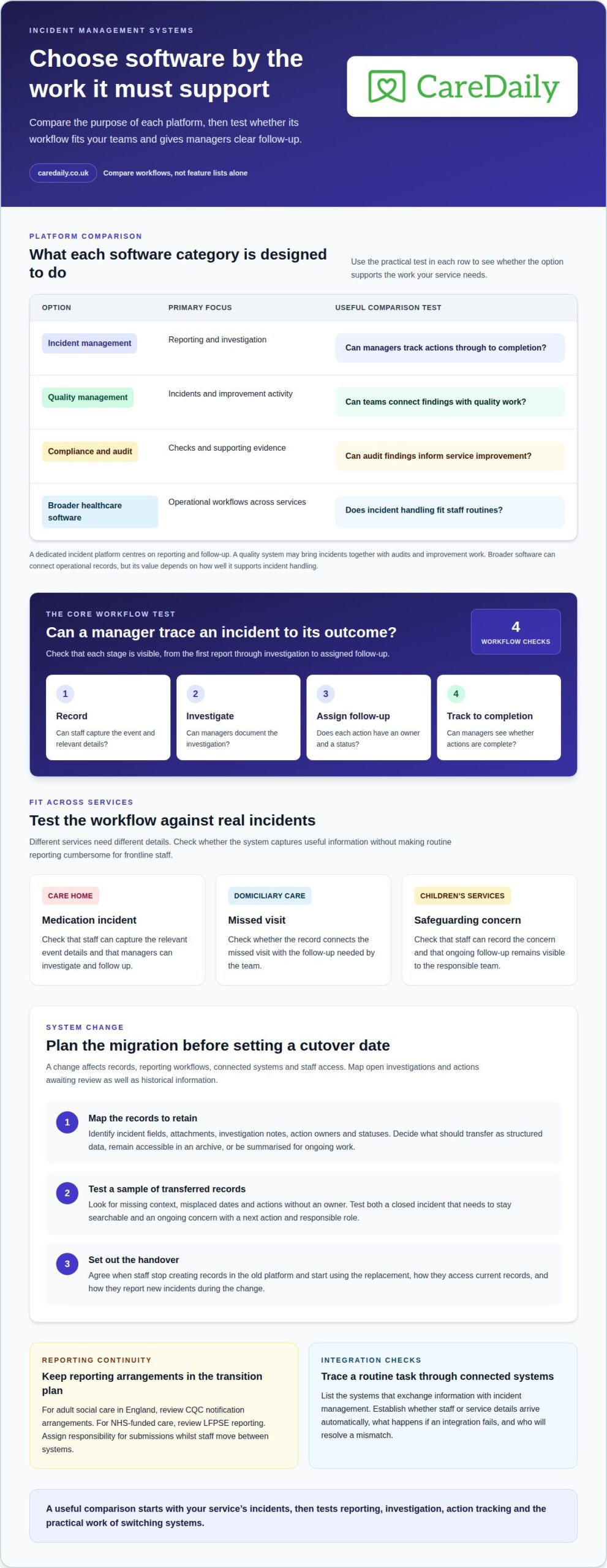
To compare incident reporting, investigation and action tracking, check whether staff can record an event, managers can document the investigation, and each action has an owner and status. Reviews from UK providers can offer practical insights into usability, but read them in context: a workflow that suits one service may not suit another.
Alternative software and use cases
Alternatives include dedicated incident management platforms, quality management systems and broader operational software. A standalone incident platform centres on reporting and follow-up; a quality system may combine incidents with audits and improvement work. Broader software can connect operational records, but its value depends on how well it supports incident handling.
What do UK healthcare providers say in reviews of alternatives? Reviews can describe how a product works in practice, including reporting steps, investigation visibility and action tracking. Look for specific examples from comparable services, such as how staff record a safeguarding concern, rather than relying on a general rating.
Incident management software
Incident management software gives teams a structured way to report, investigate and follow up events. Compared with general quality management software, its central test is whether a manager can trace an incident from initial record to completed action. This distinction matters when several teams need consistent oversight without losing the details of their own service.
UK competitor pricing and contract terms depend on the product’s scope and agreement. Compare the charging basis, included functions, user access, contract length, renewal terms and any migration arrangements; there is no single market-wide price to apply.
Compliance and audit software focuses on evidence, scheduled checks and actions arising from reviews. It can complement incident reporting, but an audit checklist doesn’t replace a clear investigation. When reviewing a medication error, for example, a provider needs to record the event and its follow-up, then use audit findings to identify wider process gaps.
| Option | Primary focus | Useful comparison criterion |
|---|---|---|
| Incident management platform | Reporting and investigation | Can managers track actions through to completion? |
| Quality management system | Incidents and improvement activity | Can teams connect findings with quality work? |
| Compliance and audit software | Checks and supporting evidence | Can audit findings inform service improvement? |
| Broader healthcare software | Operational workflows across services | Does incident handling fit staff routines? |
Choose the category that best matches the work your teams need to do and the management oversight you need afterwards.
Switching systems, data migration and integrations
Changing systems affects more than the incident form. Plan for existing records, reporting workflows, connected systems and staff access. Map these before setting a cutover date, including dependencies such as open investigations and actions awaiting review.
First, define what information must move and how teams will use it. An incident record may contain the event description, investigation notes, attachments, action owners and status. Decide what should transfer as structured data, remain accessible in an archive, or be summarised for ongoing work. This helps prevent useful history from becoming an incomplete record in the new system.
Plan reporting arrangements as part of the system change. For adult social care in England, the switching checklist advises reviewing CQC notification arrangements; providers elsewhere should check their relevant regulator’s notification arrangements. For NHS-funded care, review LFPSE reporting. Where relevant, include these in the transition plan and assign responsibility for submissions while staff move between systems. Reporting is part of the everyday workflow, not just a technical detail.
A practical migration sequence can help managers keep responsibilities clear:
- Map records: identify incident fields, attachments, investigation notes and unresolved actions that teams need to retain.
- Test a sample: review transferred records for missing context, misplaced dates or actions without an owner.
- Plan the handover: set out when staff stop creating records in the old platform and begin using the replacement.
For example, after transferring a safeguarding concern with ongoing follow-up, make sure its next action and responsible role remain visible. A closed incident may instead need to remain searchable as a historical record. Testing both cases can reveal gaps before the wider team starts using the new workflow.
Review integrations in the same practical way. List the systems that exchange information with incident management, then trace a routine task through each connection. If staff or service details are entered elsewhere, establish whether the new platform receives them automatically or requires another step. Also plan what teams should do if an integration fails and who will resolve the mismatch.
Before cutover, agree how staff will access current records, report new incidents and escalate technical problems. A short, role-based walkthrough can show a carer how to submit an event and a manager how to review its actions. If you’re preparing a transition, you can plan your next system step around the records and workflows your teams rely on.
Choosing a platform by team and incident type
Choose a platform based on the incidents each team handles and the investigations managers need to complete. A care home’s falls workflow may require different context from a domiciliary care missed visit. Assess Radar Healthcare alternatives for incident management against these operational needs, not just their feature counts.
Map each service, the roles involved and the incident types they record. For residential care, consider falls, medication errors and equipment concerns. For domiciliary care, include missed calls, accidents during visits and safeguarding concerns. Supported living and children’s services may need workflows that reflect their settings and the people involved. This mapping helps identify the form fields and review steps each service needs.
Next, identify who acts at each stage. A carer might submit the initial report, while a registered manager investigates and assigns follow-up. If a client becomes distressed after a change to their usual support routine, for example, the report should help staff describe what happened before, during and afterwards. That context can help managers review communication, routines or support arrangements.
Incident patterns can help managers decide what information to analyse. In supported living, recording when and in what context repeated distress incidents occur may help identify whether they cluster around a particular transition in the daily routine. Compare alternatives on whether managers can review relevant details across reports and identify patterns that need further attention.
For investigations, check whether managers can review related incidents by location, time, service or type. This can help distinguish an isolated event from a recurring issue, such as distress during a particular change of activity or similar concerns within one service. Keep categories meaningful: broad labels can hide important differences, while too many categories can make reporting inconsistent.
Test representative scenarios with the people who will use the system. Ask a carer to report a missed visit, then have a manager review it and assign an action. Repeat with a residential care fall and a safeguarding concern in children’s services. Check whether each workflow supports clear reporting, investigation, follow-up and learning. Include both frontline staff and managers: carers need a usable process at the point of care, while managers need oversight during review.
Configurable incident forms
A configurable incident form adapts its questions to the event being reported. That matters because a fall, medication error and missed visit need different details. Rigid, prescriptive forms can take more than 20 minutes per entry, so assess whether staff can report relevant information without completing unrelated fields.
Map each incident type to the details managers need for review. A fall report might ask for the location, time, observed injury and immediate response. A medication incident could capture the medicine involved, the stage of the process and who was informed. Use examples like these to test whether the form prompts useful accounts rather than merely collecting a category.
Check how the form guides staff through a report. Conditional questions can show follow-up fields only when they apply. Selecting “fall”, for example, could prompt a location field, while a medication selection could ask which stage of administration was involved. Keep the reporting route relevant without preventing staff from describing the circumstances in their own words.
Good form design balances consistency with professional judgement. Use structured fields for information that needs comparison, such as incident type or service location, and leave space for a factual account of what the person experienced and staff observed. A dropdown alone cannot explain that a client declined support after a missed visit or that a hazard was removed before the manager reviewed the report.
Review each form with the people who complete and investigate it. Ask a carer to report a realistic scenario, then have a manager use the entry during an investigation. Look for repeated requests for clarification, irrelevant prompts and missing details. Use what you learn to improve the wording and order of fields, rather than adding questions by default.
Check that forms also support follow-up. A manager investigating a safeguarding concern may need to distinguish the initial account from later findings and outstanding actions. If those details are blended together, the investigation can be difficult to follow. Test whether staff can record the original event and add updates without obscuring the first report.
- Relevance: Does each question apply to the selected incident?
- Clarity: Can staff understand what a field asks them to record?
- Usability: Can a frontline worker complete a realistic report efficiently?
- Review: Can a manager find the facts and follow-up needed for investigation?
Use these checks to shape forms around real reporting tasks, then explore the next step for your service.
Care Daily: Incident & Accident Reporting
Care Daily’s Incident & Accident Reporting is a practical next step for providers reviewing how incidents are recorded and managed. It sits within Care Management Software, so it may suit services seeking incident reporting alongside wider care operations.
Care teams can also use Digital Care Planning and the Policy & Procedure Library as part of their wider operational approach. When reviewing an incident, for example, a manager may need to consider the person’s care plan and relevant procedures when deciding on follow-up. The right fit depends on whether your priority is incident reporting or connected care management.
A system change affects frontline staff as well as managers. If you’re considering a change, book a Care Daily demo to discuss how its incident reporting and wider care management tools could fit your service.
Make your next system decision with confidence
Involve the people who will use the system every day in shaping how it works. Bring frontline staff and managers into the decision early, and agree how their feedback will guide adoption. This helps make the chosen approach part of routine practice rather than a separate administrative task.
When weighing Radar Healthcare alternatives for incident management, plan how you’ll review the decision after implementation. A staff check-in can reveal practical issues, such as unclear terminology or a workflow that doesn’t match the service. Use that feedback to refine the setup and keep it aligned with your teams’ needs.
If you’re ready to discuss your organisation’s priorities, talk with Care Daily. A thoughtful next step can give your team a clearer path towards a system that works well in practice.
Frequently Asked Questions
Which alternatives integrate with NHS systems, electronic patient records and Microsoft 365?
Integrations depend on the platform and the systems you use. Care Daily lists connections with NHS Spine, Outlook and Teams; this doesn’t establish integration with every electronic patient record. Check what data moves between systems, whether updates flow both ways, and how errors are surfaced. A medication reference connection, for instance, is different from sharing incident records with an electronic patient record.
Which incident management platforms are UK GDPR compliant and meet NHS data security requirements?
Assess each supplier’s published data protection and security evidence against your organisation’s requirements; a general compliance claim alone does not demonstrate that every NHS data security requirement is met. Care Daily states “GDPR safe” and lists ISO 27001. These statements are useful starting points, not a substitute for reviewing the controls relevant to your service, the information handled and any NHS procurement conditions.
Which alternatives support CQC reporting, patient safety incident response and NHS requirements?
Assess whether a platform lets your organisation document how it classifies incidents and decides on the appropriate response. For adult social care in England, establish who determines whether a CQC notification is required and who authorises it. For NHS-funded services, map the relevant local patient safety processes and decision-making roles. Test a scenario with managers to see whether the system supports clear records of decisions and rationale.
What should UK organisations consider when choosing an incident management system?
Assess governance alongside reporting: who can view or amend records, how changes are attributed, and how information can be retained or exported. Then test a realistic scenario with intended users. Ask a manager to review a carer’s incident report and identify the next action, for example. The test should make responsibility and decision-making clear.
What do UK healthcare providers say in reviews of Radar Healthcare alternatives?
Reviews can show how alternatives work in practice, from reporting steps to investigation visibility and action tracking. Look for specific examples from services comparable to yours rather than relying on a general rating.
More from the blog
Care home risk assessment software: roles and reviews
A risk assessment should support a person’s safety without unnecessarily restricting their choices. Care home risk assessment software can help staff
Read more →
Compare home care software for real-time access and data security
A familiar system is not automatically the safer choice, and moving to cloud software is not always the right answer. To compare Tagtronics with
Read more →
Which PASS care software alternatives fit your budget?
The best fit depends on your provider’s needs and budget: compare PASS with alternatives such as Care Daily, then weigh up the costs and practical
Read more →