
Compare home care software for real-time access and data security

A familiar system is not automatically the safer choice, and moving to cloud software is not always the right answer. To compare Tagtronics with modern cloud domiciliary care software, look beyond age and format: assess how each option supports oversight, compliance and secure access to records.
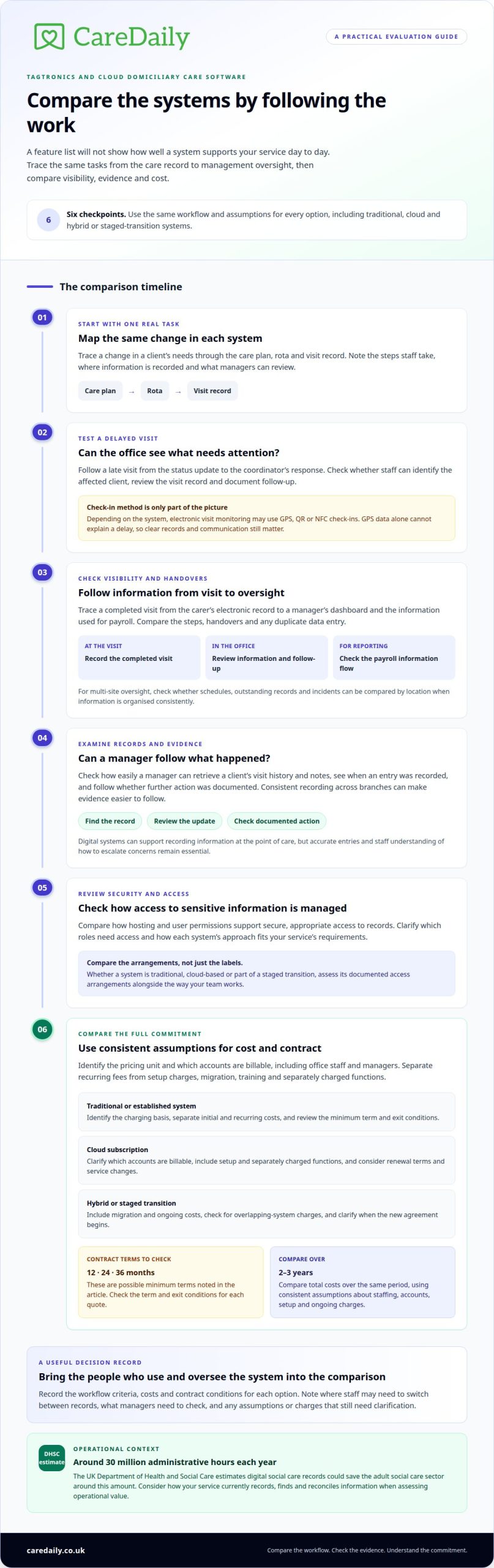
For a registered manager, the difference becomes clear when a visit is delayed and the office needs to find out what happened. Can the team see current information, follow the record of events and act without chasing scattered updates? That practical test matters as much as a list of features.
This comparison explains how traditional and cloud-based systems differ, what to assess in data security and regulatory evidence, and which approach may suit your service’s size, workflows and readiness for change. Use it to decide what staff need at the point of care and what managers need for consistent oversight.
Key Takeaways
- Judge software by how well it supports your team’s workflows and oversight, not simply by whether it is traditional or cloud-based.
- Consider how quickly coordinators can access current visit and care information when plans change or a concern needs follow-up.
- Assess whether records make it practical to document decisions, monitor updates and demonstrate accountable care.
- Review how hosting and user permissions support secure, appropriate access to sensitive information.
- Explore whether Care Daily’s care management software, digital care planning and policy library fit your domiciliary service’s operational needs.
Which is the best home care software in the UK?
There is no single best system for every UK domiciliary care provider. A Tagtronics-versus-modern-cloud domiciliary care software comparison should focus on workflows, oversight needs and total contract cost, not just the system’s format.
Compare care planning, rostering and visit management by mapping the same task in each system. For example, trace a change in a client’s needs through the care plan, rota and visit record. Note the steps staff take and what managers can review. This gives your team a practical basis for comparison without assuming unverified features.
The UK Department of Health and Social Care estimates that digital social care records could save the adult social care sector around 30 million administrative hours every year. Consider how your service handles routine recording, finding and reconciling information when weighing the operational value of a system.
Published prices are comparable only when you understand what each charge covers. A quote may be based on carers, users, services or another measure. Per-carer and per-user pricing can affect providers differently as staffing and account needs change. Before comparing quotes, establish which roles count as users, including office staff and managers.
Separate monthly subscriptions from setup charges. Include any costs for migration, training or additional functions in the comparison, rather than looking only at the recurring fee. UK home care software contracts may have minimum terms of 12, 24 or 36 months. Compare the total cost over two to three years and consider how the commitment fits your service plans.
Use the same criteria to assess Tagtronics and modern cloud domiciliary care software:
| Option | Pricing unit | Setup and monthly charges | Contract considerations |
|---|---|---|---|
| Traditional or established system | Identify the basis used for charges. | Separate initial and recurring costs. | Review the minimum term and exit conditions. |
| Cloud subscription | Clarify which accounts are billable. | Include setup and any separately charged functions. | Consider renewal terms and service changes. |
| Hybrid or staged transition | Establish whether overlapping systems incur charges. | Include migration and ongoing costs. | Clarify when the new agreement begins. |
Choose the option whose pricing basis, commitment and documented functions fit your staffing model and care workflows.
Involve the people who will use and oversee the system in your evaluation. Ask how clearly each option supports the tasks you mapped, where staff may need to switch between records, and what managers need to check. Base the comparison on your service’s actual workflows, not on which system appears to offer more functions. Record assumptions that need clarification, such as charges for different accounts or what setup includes.
Compare the total cost of care software over the same period for every option, using consistent assumptions about staffing, account needs, setup and ongoing charges. Weigh the resulting commitment against the documented functions and contract conditions. If your service’s needs or plans may change, consider whether the agreement and pricing basis will still suit you. Keeping a clear record of criteria, costs and outstanding questions helps decision-makers explain their choice and identify what to clarify before proceeding.
Real-time information and multi-site visibility
Cloud systems can make updates available across an agency, but their value depends on what staff record and managers can see. Compare traditional and cloud platforms by following the same visit, client update and reporting workflow in each.
For integrations, reporting and payroll, assess whether each system connects operational records to the reports and processes your team uses. For example, trace a completed visit from a care worker’s electronic record to a manager’s dashboard and the information used for payroll. Compare the steps, handovers and any duplicate data entry.
A dashboard is useful when it surfaces information that needs action, rather than merely displaying activity. A coordinator, for example, may need to spot a missed check-in, review the visit record and contact the carer. Managers overseeing multiple branches may also need to compare schedules, outstanding records and incidents by location, if information is organised consistently.
Real-time visit monitoring can help teams respond to changes during the day. Depending on the system, electronic visit monitoring may use GPS, QR or NFC check-ins. For a late visit, test whether the office can see the status, identify the affected client and document follow-up. GPS data alone cannot explain a delay, so clear records and communication still matter.
Monitoring a client’s care is different from tracking a carer’s arrival. Digital charts can record observations such as fluid intake or repositioning when these form part of a person’s support. Managers should be able to find an entry, see when it was recorded and check whether further action was documented. A live screen is useful only when entries are accurate and staff know how to escalate concerns.
The Care Quality Commission says digital systems can make it easier to capture information at the point of care, respond more quickly to people’s needs and reduce safety risks. During an inspection, a manager may need to retrieve a client’s visit history and notes without piecing together separate paper records. Consistent recording across branches also makes evidence easier to follow.
At Care Daily, we find that the useful comparison is often a real shift, not a feature list. Trace a morning visit change from the carer’s record to the coordinator’s response, then check what appears in management reporting. Providers considering a connected workflow can explore the next steps.
Compliance with CQC, the MCA and UK GDPR
For an adult social care service in England, software can help organise evidence for CQC oversight, but it cannot make care compliant by itself. Accurate records still depend on staff documenting what happened, when it happened and what action followed.
CQC does not require domiciliary care providers to use a particular software system. Judge digital and traditional systems by whether they help your service maintain accurate, contemporaneous and auditable care records. For an inspection, a manager may need to trace a concern from its original entry through review, action and follow-up.
That audit trail should make the care decision understandable. If a client declines support, for example, a useful record captures their wishes, the relevant context and the response agreed by staff. An entry that says only “care refused” offers less evidence of how the carer respected the person’s choices and communicated the concern.
The Mental Capacity Act 2005 applies in England and Wales and is relevant to documenting capacity assessments, best-interest decisions and ongoing reviews, according to The National Archives (legislation.gov.uk). Records should make the decision and its context clear, rather than treating a capacity assessment as a permanent label. A later change in circumstances may prompt a review, and the record should show how that was considered.
Care planning must also connect decisions to day-to-day support. If an assessment identifies a risk, the care plan should set out the agreed approach in language carers can apply during a visit. Subsequent records can show whether staff followed that approach, what they observed and whether they reported a change to the coordinator.
Audit trails help managers track amendments and find gaps across care records. When reviewing a medication-related concern, for example, a manager may need to locate the relevant plan, the record and any documented follow-up. If these records are scattered, assembling the evidence can be harder; consistent organisation makes review more straightforward.
UK GDPR considerations also affect how care information is handled. Compliance depends on the provider’s processes, staff practice and management of personal information, not simply the software’s format. Clear permissions, suitable staff training and consistent recording all support accountable care management.
In a care home, staff may record support delivered in a shared setting. In domiciliary care, records often need to follow a client across visits and staff handovers. In either setting, managers need records that show the person’s needs, decisions made and the service’s response. Test whether an authorised reviewer can follow that sequence without relying on staff memory alone.
Data security, hosting and user permissions
Cloud hosting and locally managed systems differ in where records are stored and how staff access them. For a UK care agency, compare hosting arrangements, permissions and the provider’s data protection processes.
Data security and hosting
Hosting describes where electronic care records are stored and how authorised staff access them. A cloud platform can support access from different locations, while a locally managed system may rely more on the agency’s own infrastructure and access arrangements.
The Data Protection Act 2018 and UK GDPR are relevant to lawful, secure and transparent data processing in UK social care, according to The National Archives (legislation.gov.uk). These laws apply to how providers handle personal information, including care plans and medication records, rather than determining whether a system uses cloud or local hosting.
Compare how each option protects records, manages updates and maintains an audit trail. Buyers are advised to look for ISO 27001 certification, which concerns information security management. A care provider should also understand where data is hosted, how access is managed and what happens to records when a contract ends.
Assess security in the context of everyday work as well as major incidents. A care worker may need current medication information during a visit, while a payroll colleague needs employment data. Separating these needs helps prevent unnecessary access to sensitive records.
User permissions and data protection
User permissions determine which records or functions an account can access. This is separate from hosting: a secure server alone does not prevent an unauthorised staff member from viewing a client’s information.
In a domiciliary care service, permissions might distinguish a carer recording a visit from a manager reviewing care plans or a payroll user handling timesheets. Access should match each role’s responsibilities. When staff roles change, review their permissions too.
Families and friends may need access to selected information, but it should be limited to what is appropriate for them. Distinguishing a client’s care information from a worker’s employment records helps prevent accidental disclosure.
Audit trails can show which user accessed or changed a record and when. If a medication entry is amended, the history helps managers understand the sequence and investigate concerns. Regular access reviews can also identify accounts that no longer need access.
CQC evidence depends on clear records and accountable practice, not a software label. Compare how each system supports appropriate access, traceable changes and secure handling across your service. Explore the next steps for your care software when you are ready to consider a change.
Care Daily: Domiciliary & Community Care Management Software
Care Daily provides domiciliary and community care management software to organise care management and documentation. Its digital care planning supports structured, accessible plans, while the Policy & Procedure Library gives providers a central resource for operational guidance.
Consider Care Daily when reviewing how your service manages care plans and related procedures, or when you want these tasks in a more consistent digital workflow. Fit depends on your team’s processes and the records managers need to oversee.
If you’d like to discuss how Care Daily could support your service, contact Care Daily.
Make the next step fit your service
When comparing Tagtronics with modern cloud domiciliary care software, consider how your team will manage the change as well as the system itself. A platform can support new ways of working, but clear process ownership helps staff use it consistently.
Before deciding, agree who will lead implementation, how existing records will be handled and how staff will learn the workflows relevant to their roles. Include coordinators and carers: they can identify practical snags that may not emerge in a management demonstration. A clear transition plan helps your service adopt new processes.
Define the operational outcomes you want to support, then use those priorities to guide a focused discussion about fit. Care Daily can explain how its platform relates to your service’s needs and working practices, without assuming one approach suits every provider.
Start a conversation with Care Daily when you’re ready to consider your next step. A considered decision can help your team move forward with confidence.
Frequently Asked Questions
What are the setup, migration, training and support requirements when switching care software?
Plan the switch around data transfer, configuration and staff training, with clear ownership for each task. Confirm with your chosen provider what migration support and training are available, and what your team will need to manage. Arrange training around actual duties, such as coordinators updating rotas and carers recording visits. Check what support the provider offers during adoption, including how staff can raise questions and find guidance.
How does Tagtronics compare with cloud care software for care planning, rostering and visit management?
Map the same change in a client’s needs through care planning, rostering and visit records in each system. Compare the steps staff take and the information managers can review.
How do Tagtronics and cloud care platforms compare on integrations, reporting and payroll?
Trace a completed visit from the care worker’s electronic record to a manager’s dashboard and the information used for payroll. Compare handovers and any duplicate data entry.
What are the prices and contract terms for Tagtronics versus UK cloud domiciliary care software?
Compare quotes by their pricing unit, setup and monthly charges, and any migration, training or additional-function costs. Contracts may have minimum terms of 12, 24 or 36 months, so compare total costs over two to three years.
More from the blog
Care home risk assessment software: roles and reviews
A risk assessment should support a person’s safety without unnecessarily restricting their choices. Care home risk assessment software can help staff
Read more →
Which PASS care software alternatives fit your budget?
The best fit depends on your provider’s needs and budget: compare PASS with alternatives such as Care Daily, then weigh up the costs and practical
Read more →
Radar Healthcare pricing or care compliance software costs
The cheapest-looking option isn’t always the easiest to budget for. A useful Radar Healthcare pricing vs care compliance software comparison starts
Read more →