
Radar Healthcare pricing or care compliance software costs

The cheapest-looking option isn’t always the easiest to budget for. A useful Radar Healthcare pricing vs care compliance software comparison starts with what you can see upfront: some providers publish prices, while others use demonstrations and tailored quotes to define costs.
It’s reasonable to want a clear cost before booking a software demonstration. For health and social care providers, however, the headline figure is only part of the decision. The number of services and locations, the functions you need and the implementation scope can all affect what a quote covers.
This article explains the difference between published pricing and a tailored quote, and what to compare beyond the initial figure. It covers compliance, audits, incident management and governance, helping you assess value for your setting without mistaking a demonstration for a price list.
Key Takeaways
- Separate published prices from demo- and quote-led pricing to understand what each figure actually covers.
- Compare the scope of compliance, audit, incident and governance tools, not just the headline cost.
- Consider how your services and locations shape the software you need and the value it may deliver.
- Look beyond price when assessing customer views: the fit between features, day-to-day workflows and organisational needs matters too.
- Explore whether Care Daily’s care management software, digital care planning, staff rostering and policy library align with your operational priorities.
Software for health and social care organisations
Care compliance software supports the operational work behind safe, consistent services. In the UK, providers may use digital systems to organise records, workforce compliance, incidents and oversight across different care settings. The right comparison starts with the work your teams need the software to support, rather than the product label. A domiciliary care manager, for example, may prioritise visit records, whilst a supported living service may focus on consistent documentation across individual support arrangements.
UK social care software can bring separate tasks into a connected workflow. Consider an incident recorded after a missed visit: managers may need to understand what happened, document follow-up and identify wider patterns. Software can support this process when relevant records and reporting tools work together. During a demonstration, trace one realistic event from initial record to review, rather than relying on a feature name alone. Note which staff roles contribute information and where managers can see the outcome.
Requirements also vary across health and social care. A residential care team may need a different daily workflow from a community service coordinating visits across several locations. Technology can play a useful role in supporting adult social care services. Integration is intended to reduce duplicate data entry and administrative work, and support care organisations of different sizes and across multiple locations. In practice, ask how information moves between the systems your teams already use.
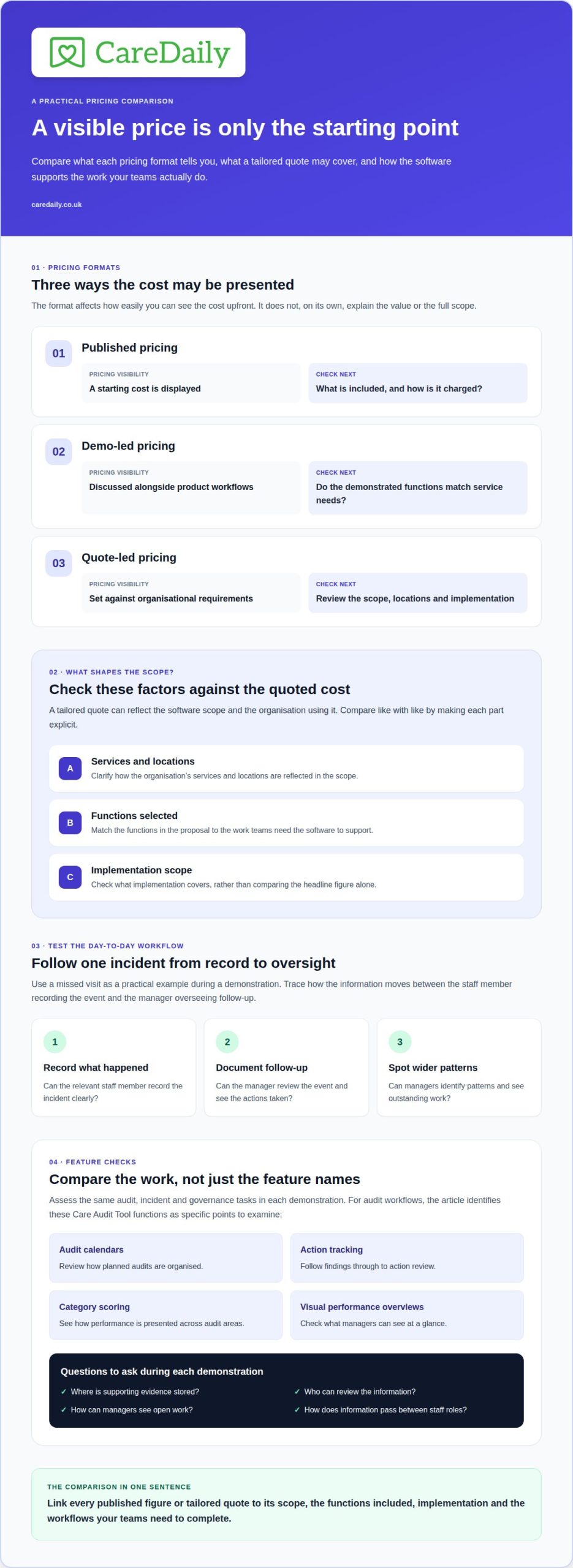
Pricing presentation is another distinction. A published price gives a visible starting point, whilst demo- and quote-led pricing usually requires a conversation about the organisation’s requirements. The amount a quote covers depends on the software scope, selected functions, implementation and organisational structure. A provider’s software pricing information can show how published costs are presented; compare its stated inclusions with the scope offered through a demonstration.
A health and social care podcast can offer context on how peers discuss digital records, implementation and service pressures. Treat it as a starting point, not a substitute for seeing a workflow in practice. For example, take a question about incident follow-up into a demonstration: can a manager find the record, understand its status and see the actions taken? This gives the discussion a practical focus and connects general commentary with your team’s processes.
| Option | Pricing visibility | Useful comparison point |
|---|---|---|
| Published pricing | Starting cost is displayed | Check inclusions and charging basis |
| Demo-led pricing | Discussed alongside product workflows | Match demonstrated functions to service needs |
| Quote-led pricing | Set against organisational requirements | Review scope, locations and implementation |
Use the table to organise the comparison, not to judge quality. A published figure may be easier to find, while a tailored quote can reflect a defined scope. Neither format explains value on its own. The key is what staff can do with the system and which administrative steps it supports.
For a fair assessment, list the workflows that matter most, such as recording an incident, reviewing workforce compliance or coordinating information across locations. Follow those tasks during each demonstration and note where data is entered, viewed and acted on. This matters especially for teams working across community and residential settings, where a process may involve different staff roles and handovers.
Choose the pricing approach that makes the scope and day-to-day workflow easiest to understand. A useful comparison links the quoted or published cost to the work your health and social care teams need to complete.
How do Radar Healthcare and Care Compliance compare on compliance, audits, incidents and governance features?
Separate named functions from assumptions based on a product’s overall description. For Radar Healthcare and Care Compliance, assess the same audit, incident and governance tasks in each demonstration. The available feature detail identifies Care Audit Tool dashboards for compliance audits, calendars, action tracking, category scoring and visual performance overviews. These provide specific comparison points, but do not show that every product works in the same way.
Start with the audit workflow. Can a manager see planned audits, record findings, assign actions and review progress in one process? Care Audit Tool’s stated calendar and action-tracking functions address parts of that workflow. Category scoring and visual overviews can present performance across audit areas. In a demonstration, follow a sample audit finding from entry through action review. This shows how practical the workflow feels to the people responsible for follow-up.
Compliance tools should make evidence easy to organise and retrieve. A manager preparing for an internal review might need to go from a flagged audit category to its supporting record, then see whether an action is outstanding. Ask each supplier to demonstrate those steps using a realistic example. Note where evidence is stored, who can review it and how the organisation sees open work. These details help distinguish a useful process from a dashboard that only summarises activity.
Test incident reporting separately. After a missed visit, for example, staff may record what happened while a manager reviews the event and follow-up. Compare how each system supports recording, review and oversight. Don’t assume an audit dashboard also handles incident management. Check that the demonstration shows the full incident path, including how managers find records and identify outstanding actions. The handover between the person recording an event and the person overseeing it should be clear.
Governance connects these processes through oversight and follow-through. Compare how each platform presents audit activity, incident information and outstanding actions to managers. A visual performance overview can support a quick review, but its value depends on the underlying information and the decisions it helps managers make. Ask for an example involving a service-level issue, such as repeated missed documentation, and see whether the system helps staff locate relevant records and track progress.
Ground the comparison in your own roles and services. A registered manager may need a high-level view, while an auditor needs access to detailed findings. In domiciliary care, an incident may relate to a visit; in residential care, an audit may examine a process used across the service. Test the same scenario with the relevant roles and record what each person can see and do. This avoids comparing feature names without examining their practical use.
At Care Daily, we find that a short, realistic workflow makes a software demonstration more useful than a broad feature tour. For each system, record whether the audit calendar, action tracking, category scoring, incident review and governance overview match your priorities. Separate demonstrated functions from assumptions and note any unclear steps. This gives your team a grounded basis for comparing operational fit alongside the pricing approach.
Use the comparison to identify the processes your organisation most needs to bring into clear view. If you want to map those priorities to a care management workflow, explore the next step.
What do UK customers say about Radar Healthcare and Care Compliance pricing and value?
Customer views can help you understand what feels valuable in daily use, but individual experiences are not a universal verdict. A Radar Healthcare pricing vs care compliance software comparison should therefore look beyond whether a comment sounds positive or negative. Consider what the writer values: ease of use, staff confidence, consistency between teams or the ability to maintain established working practices.
Adoption is one useful consideration. A system may offer functions managers value yet feel harder to use for staff working across different shifts or locations. Look for customer accounts describing how people use the software in everyday work, rather than relying only on broad statements about satisfaction. The details can help you decide what to explore in a demonstration.
Value can also mean continuity. A provider may want information to remain accessible when a manager is away, a team changes or a service expands. Priorities vary: a small team may value a straightforward shared process, while a multi-service provider may focus on consistency between teams. Customer feedback is most relevant when the organisation’s circumstances resemble yours.
When reading opinions about Radar Healthcare and Care Compliance, separate the experience described from the conclusion drawn. A comment about ease of use does not prove that every role will find the same system easy. Similarly, a positive account from one team does not establish that another setting will see the same benefit. Treat each detail as a prompt for your own evaluation.
Use these questions to interpret customer feedback:
- Whose experience is described? Identify the role and service setting behind the comment.
- What does “value” mean there? Look for priorities such as staff confidence or consistency.
- Does the situation resemble yours? Consider whether the account reflects similar teams and working patterns.
- Is the view specific? Distinguish a concrete account from a broad endorsement or criticism.
This approach avoids treating customer comments as a substitute for operational judgement. A manager may value a consistent way to share updates across shifts, while a coordinator may focus on how easily staff find current information. Both perspectives matter, but they raise different questions about day-to-day fit. A useful review connects each comment to the people and processes it describes.
At Care Daily, we find that teams assess value more clearly when they consider how a system will become part of routine practice. Think about staff induction, handovers and how managers maintain consistent ways of working. These considerations add practical detail to a Radar Healthcare pricing vs care compliance software comparison, without assuming that another customer’s experience predicts yours.
Use customer feedback as one perspective alongside your own priorities and observations. A considered decision reflects what your teams need to work confidently and consistently, rather than chasing a general verdict. To discuss how Care Daily could fit your organisation’s requirements, get started with a requirements review.
UK customers’ views reflect individual experiences. The value they describe may centre on ease of use, staff confidence, consistency across teams or continuity of information. Priorities vary with an organisation’s size, services and working patterns.
Care Daily
Care Daily is a practical next step if you’re comparing software costs with the work your teams need to manage. Its care management platform brings together digital care planning, staff rostering and a library of policy and procedure templates, helping providers consider operational and compliance needs alongside audit and incident workflows.
For example, a domiciliary care manager may be assessing how rostering and care plans support consistent coordination, whilst a residential service may prioritise policy access and structured planning. Care Daily’s library includes 500+ policy and procedure templates. The right fit depends on how these functions align with your organisation’s existing processes and priorities.
If you’d like to discuss how Care Daily could support your requirements, contact Care Daily.
Make your next software decision with confidence
A decision about Radar Healthcare pricing vs care compliance software is most useful when it leads to a clear implementation plan, not just a preferred quote. Before committing, identify who will oversee the transition, how staff will learn the new workflows and what operational signs will show the system is working for your service. These practical steps keep the software connected to the care your teams deliver.
Consider how your chosen platform will fit managers’ routines, from reviewing records to following up actions. It should support your organisation’s priorities and give staff a process they can use consistently. If you’re comparing options, book a Care Daily demonstration to see how its platform could fit your operating model.
Discuss your requirements with Care Daily and take the next step at a pace that works for your organisation.
More from the blog
Care home risk assessment software: roles and reviews
A risk assessment should support a person’s safety without unnecessarily restricting their choices. Care home risk assessment software can help staff
Read more →
Compare home care software for real-time access and data security
A familiar system is not automatically the safer choice, and moving to cloud software is not always the right answer. To compare Tagtronics with
Read more →
Which PASS care software alternatives fit your budget?
The best fit depends on your provider’s needs and budget: compare PASS with alternatives such as Care Daily, then weigh up the costs and practical
Read more →