
Which PASS care software alternatives fit your budget?
The best fit depends on your provider’s needs and budget: compare PASS with alternatives such as Care Daily, then weigh up the costs and practical requirements of each option. Look beyond the headline price to consider care features, migration, staff support and how your service will operate during the change.
No single switching schedule suits every provider. The scope of data migration, the systems and processes involved, and the time available for staff onboarding all shape the plan. A domiciliary care team coordinating visits throughout the day, for example, may need a different training approach from a residential service managing records on site.
This article compares alternatives by pricing, care features, switching, support and inspection reporting. Use these practical criteria to assess what your service needs and identify a platform that fits both your budget and the way your team delivers care.
Key Takeaways
- Compare rostering, visit scheduling, eMAR and family-app features against the way your service operates, not just the software’s headline offer.
- Look at what each subscription or per-bed pricing model includes, and how a tailored quote may reflect your organisation’s needs.
- Plan a software switch around data migration, staff onboarding and the support needed to keep care records consistent during go-live.
- Assess how audit trails, care assessments and reporting can help your team prepare evidence for internal reviews and inspections.
- Consider whether an integrated platform covering care management and policy compliance would suit your service’s operational needs.
Which rostering, eMAR and family-app features should you compare?
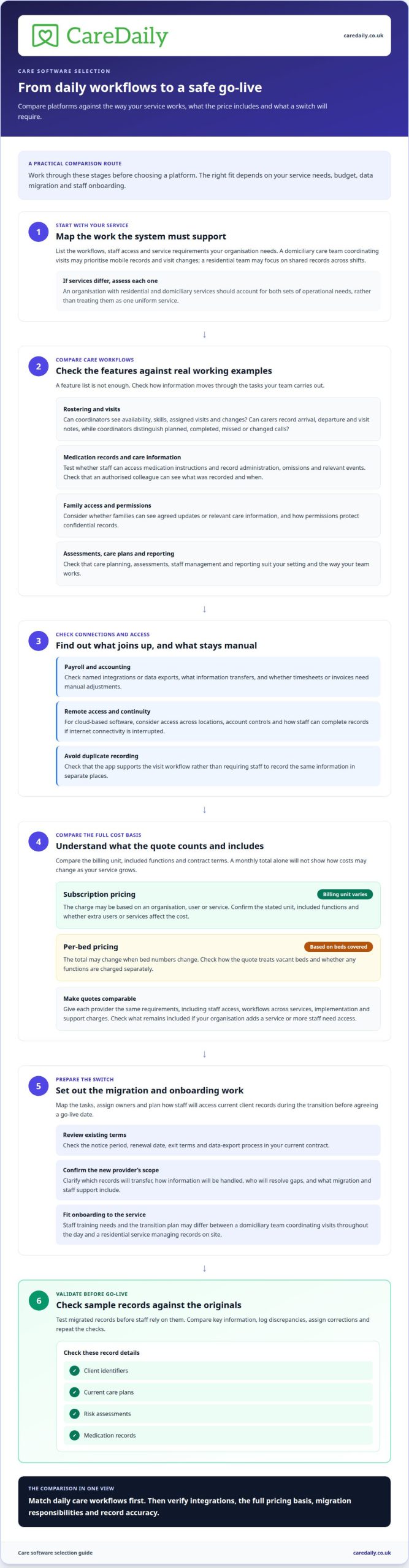
Compare how each system connects a planned visit with the carer’s record and the client’s care information. A rota can look complete while coordinators still have to reconcile changes manually when visits move or staff availability shifts.
UK care management systems differ in how they connect with payroll and accounting software. Compare the named integrations or data exports, the information transferred and whether timesheets or invoices require manual adjustments.
For workforce management, assess whether rostering brings availability, skills, assigned visits and changes into one workflow. In domiciliary care, a late cancellation can affect several calls. Check how coordinators identify uncovered visits and communicate revised assignments.
Visit scheduling should make planned and completed calls easy to distinguish. Check whether carers can record arrival, departure and visit notes in a mobile app, and how coordinators see missed or changed visits. The app should support the visit workflow, not create duplicate recording.
For eMAR, compare how staff access medication instructions and record administration, omissions and other relevant events. Test a realistic handover: can an authorised colleague see what was recorded and when without searching separate notes?
Family-app features should serve a clear purpose. Consider whether families can see agreed updates or relevant care information, and how permissions protect confidential records. Family access can improve communication when the service controls who sees each item.
Look for care planning, assessments, scheduling, staff management, eMAR and reporting that suit your setting. A residential team may prioritise shared records across shifts; a domiciliary service may focus on visit changes and mobile documentation.
Cloud-based care software can make records accessible across locations, but teams still need to consider internet access and account controls. Compare remote access and continuity arrangements, including how staff can complete records when connectivity is interrupted.
| Option | Rostering | eMAR | Family access | Integration |
|---|---|---|---|---|
| Integrated care platform | Rota and visit workflow | Within care records | May be available | Check payroll and accounting links |
| Scheduling-focused system | Visit allocation focus | May require an add-on | May require an add-on | Check export options |
| Modular system | Depends on selected modules | Depends on selected modules | Depends on selected modules | Check each connection |
Choose software whose rostering, medication records, family access and integrations match your service’s daily workflows.
How do subscription and per-bed pricing models compare?
Compare the billing unit, included functions and contract terms before deciding which quote fits. A monthly total alone won’t show how costs might change as your service grows.
Subscription pricing
A subscription charges for access using a defined unit, such as an organisation, user or service. The quote should state that unit, the included functions and whether extra users or services affect the charge. Compared with per-bed pricing, an organisation-based subscription may be easier to forecast when bed numbers fluctuate. Staff or service growth may still affect the cost, depending on the charging basis.
Per-bed pricing
A per-bed model ties the charge to the number of beds covered. This can make a residential service’s quote easier to relate to its capacity, although the total may change when bed numbers change. Unlike a subscription based on an organisation or user, the calculation centres on beds. Compare how the quote treats vacant beds and any separately charged functions.
When comparing alternatives to PASS care software in the UK, review each quote’s stated pricing basis rather than inferring costs from plan names. Compare Pro and Outstanding against the stated billing unit, included functions and conditions that affect the total. Check whether care planning, records and other required workflows are included or priced separately. This helps distinguish differences in value from differences in coverage.
Tailored quotes may reflect service types, users, selected functions and operational requirements. For a fair comparison, give each provider the same requirements: staff access, workflows across services, and any implementation or support charges. An organisation with residential and domiciliary services, for example, should consider both sets of operational needs rather than treating them as one uniform service.
When weighing PASS care software alternatives in the UK, account for possible changes. Model what happens if the organisation adds a service or more staff need access. Note the current billing unit, what could change it and which functions remain included. This gives managers a clearer basis for comparing subscription and per-bed options than a headline figure alone.
If you’re assessing how a software option could fit your requirements, explore the next steps.
How long does switching care software take, and what go-live support should you expect?
Set the switching timeline around data migration, staff training and the complexity of your service. Map the tasks, assign owners and plan how teams will access current client records during the transition before agreeing a go-live date.
Before signing, review your existing contract’s notice period, renewal date, exit terms and data-export process. For the new system, confirm what migration includes, which records transfer, how information is handled and who resolves gaps. After transfer, a client’s care plan, assessment history and contact details should remain identifiable together.
Test sample migrated records before staff rely on them. Compare key fields, such as client identifiers, current care plans, risk assessments and medication records, with the originals. Log discrepancies, assign corrections and repeat checks after updates. This creates a practical evidence trail for migration decisions and reduces the risk of staff working from incomplete information.
Match training to each role’s daily tasks. Coordinators can practise scheduling and reviewing visit changes, while carers rehearse finding current client instructions and recording a visit. Residential teams need practice handing over records between shifts; domiciliary teams need a clear process for carers to access information away from the office.
Plan go-live support around named contacts, escalation routes and the first live workflows. Agree how staff report access problems, missing records or medication-entry questions, and who triages each issue. Keep a shared log of the issue, owner, action and resolution. Managers can then distinguish a training question from a migration fault without losing track of either.
Protect compliance evidence during the switch by mapping audits, incidents, signatures and care reviews to their locations in the new system. Identify records that must remain accessible, then test retrieval before retiring old access. A manager preparing for an inspection, for example, should be able to find a client’s current assessment and relevant review history without searching disconnected files.
A phased rollout can help teams learn workflows before wider adoption, provided the transition plan clearly states which system holds the current record. Set milestones for migration testing, role-based training, access checks and go-live review. Track unresolved issues daily during launch, then use the log to prioritise support and protect continuity for clients.
How can care software support audits, reporting and inspections?
Care software can bring audit evidence into searchable records, helping managers review practice across an organisation. Look for links between assessments, care plans, incidents and reviews. For example, a manager should be able to trace how an identified mobility risk connects to the client’s assessment, agreed support and later review.
In domiciliary care, reporting should help managers spot patterns across visits, not just individual entries. A missed call, late arrival and change in a client’s needs may sit in separate records unless the system connects them. Useful filters let managers focus on a service, date range or event type, then follow up with the relevant team.
Assessment records support consistent oversight when they show who completed an assessment, what changed and how the change affected care planning. A review of a client’s needs should be traceable to updated staff instructions. Managers can sample records across the organisation and check whether changes appear in both the assessment and the working care plan.
Audit tools are most useful when they turn findings into assigned actions. A manager might record a gap in a care-plan review, assign an owner and due date, then document the outcome. Reports can reveal recurring issues, such as incomplete visit notes or delayed follow-up, so managers can address the process rather than treating each record in isolation.
Before an inspection, managers need to retrieve records clearly. They should be able to find a client’s current assessment, care plan, relevant visit records and follow-up actions without relying on one staff member’s memory. Residential care may centre on shift handovers; domiciliary care may require evidence spanning office coordination and visits in clients’ homes.
Reporting supports preparation, but it doesn’t replace professional judgement or a clear account of care delivered. Check that reports can be understood by the staff who act on them, and that access controls suit each role. If you’re reviewing how digital records could support inspection readiness, explore practical next steps for care management.
Care Daily
Care Daily provides care management software and a policy library for providers bringing operational records and governance work together. The platform combines care planning, staff rostering and policy resources in one environment, helping organisations move away from disconnected processes. It is designed to support consistent working while teams focus on person-centred care.
The Care Daily platform brings together client records, scheduling, assessments, care plans and staff management. These connected tasks help managers relate care planning to workforce coordination. For example, an assessment can inform a client’s care plan while a coordinator uses the rota to organise staff around the planned support.
Digital care planning and staff rostering support practical parts of this workflow. A clear digital plan gives staff a consistent reference for agreed support, while rostering helps managers coordinate the workforce. Care Daily’s policy and procedure library brings governance documents alongside operational tools. Assess how these functions fit your processes rather than judging the platform on one feature alone.
Service context matters. A domiciliary provider may need to coordinate visits across clients’ homes, while a residential team may focus on consistent records between shifts. Supported living, children’s services and mental health settings bring their own working practices. Care Daily serves multiple care settings, so providers can assess the platform against their organisation’s mix of services and the tasks staff complete each day.
When considering a change, map the workflows that matter to your teams, the records managers need to oversee and the governance resources your organisation uses. Then assess whether a connected platform fits those priorities. Care Daily brings care management and policy compliance together, so providers can consider operational and governance needs in one place.
If you’d like to discuss whether Care Daily fits your organisation’s needs, contact Care Daily.
Choose a system your team can grow with
The best software decision is not simply the lowest quote. Choose a system your team can use consistently, with a transition plan that protects continuity and gives managers a clear view of daily practice. Before deciding, weigh the trade-offs that matter most now and those that could become more important as services change.
For providers weighing PASS care software alternatives in the UK, the next step is to connect the comparison to your own workflows. Consider how staff will use the system during a busy shift, how managers will review records, and whether the planned change feels manageable for the people delivering care. A practical conversation can help clarify those priorities without committing you to a particular approach.
Care Daily gives providers a way to explore how its platform could fit their operational and compliance needs. Discuss your options with Care Daily and take the next step when it suits your organisation.
Frequently Asked Questions
Which software is the best option?
The right option fits your service model, workflows and governance priorities. A provider running several types of service may value one system for consistent oversight, while a single-service organisation may prioritise specific daily tasks. Consider who needs access to which records, how managers review changes and whether the system can adapt as your organisation develops. Care Daily supports providers across multiple care settings.
Which care software alternatives support compliance and inspection requirements?
For adult social care in England, look for tools that help organise evidence and support your organisation’s compliance processes. Policies that support your organisation’s compliance processes, attributable records and clear access permissions can help managers maintain oversight, but software cannot guarantee compliance or an inspection outcome. Care Daily offers a policy and procedure library and care quality compliance tools, including policy assignment and sign-off to organise staff acknowledgement.
How can a UK care provider switch from PASS to another care software system?
Plan the change around operational handovers that cannot be missed. Alongside data transfer and staff access, identify when medication records, payroll submissions and client invoices are reconciled. Set a cutover point that avoids splitting a reporting period across systems, and name a manager to resolve questions about older records. A brief role-based practice session can show staff where the current record sits before they use it in live care.
Which care software is best for UK domiciliary care, residential care and supported living?
Choose software that reflects how each setting delivers and records support. Domiciliary teams need workflows suited to visits in clients’ homes; residential services often focus on continuity between staff and shifts. Supported living providers may need records that reflect individual support arrangements and each person’s autonomy. Care Daily serves these and other care settings, so providers can assess whether its care management and policy compliance tools suit their service mix.
More from the blog

Care home risk assessment software: roles and reviews
A risk assessment should support a person’s safety without unnecessarily restricting their choices. Care home risk assessment software can help staff
Read more →
Compare home care software for real-time access and data security
A familiar system is not automatically the safer choice, and moving to cloud software is not always the right answer. To compare Tagtronics with
Read more →
Radar Healthcare pricing or care compliance software costs
The cheapest-looking option isn’t always the easiest to budget for. A useful Radar Healthcare pricing vs care compliance software comparison starts
Read more →