
Compare prices and plans for UK care software alternatives

The software change is rarely the only thing that determines how long switching takes. There’s no single timetable for UK care software alternatives: the work depends on the records and workflows being moved, how the new system is configured, and how staff are trained.
It’s understandable to focus on disruption. Managers need visits covered, medication records maintained and care teams confident using the system, not simply a new platform switched on. A domiciliary care team may need to map visit schedules and handovers, while a residential service may need to fit medication rounds and daily records into staff routines.
This guide explains how to compare alternatives for switching, costs, security, training and care coordination. It also covers practical questions to help you judge whether a platform supports your service’s day-to-day work, rather than merely reproducing features you already have.
Key Takeaways
- Compare the full cost of a platform, including any add-ons, against the functions your service actually needs.
- Assess security by looking at how the system handles access, records and information sharing across your team.
- Plan a switch around data migration, workflow set-up and staff training, not just the date the new system goes live.
- Check that digital care plans and scheduling support clear handovers between office teams and frontline staff.
- Consider whether Care Daily’s care management platform, policy library, digital care planning and staff rostering fit your service’s priorities.
Data protection and security standards
Security needs to work in the office, during visits and at handover. A care management platform may hold sensitive client records, assessments and incident reports, so compare how each system controls access, records activity and supports secure information sharing.
Which UK care management platforms support CQC inspections and regulatory requirements? Platforms that organise care records and make relevant evidence accessible can help providers prepare for inspections in England. CQC encourages the use of digital social care records, but software alone cannot demonstrate that a service meets its responsibilities.
Start with access controls. Ask how a platform assigns permissions to roles such as registered managers, coordinators and frontline staff. A carer viewing a client’s care plan needs relevant information for a visit, but may not need access to every management record. Check how access is removed when a staff member leaves or changes role.
Audit trails matter, too. They show who changed a record and when, helping managers trace a care-plan update or incident report. If a client’s needs change after a review, for example, the service should be able to trace the update and identify which staff can see the current instructions. Include lost devices, account access and data exports in the same review.
| Option | Access controls | Audit evidence | Certification evidence |
|---|---|---|---|
| Cloud care software | Review role permissions and account removal | Ask how record changes are logged | Request current certificates and their scope |
| Locally hosted software | Clarify who manages user access | Establish how activity records are retained | Ask which organisation and services are covered |
| Paper-led records | Consider physical access and authorised handling | Review how amendments are attributed | Assess the separate controls protecting stored files |
Choose an option with controls suited to your workflows, devices and inspection evidence needs.
Security certifications and accreditations can help assess a supplier’s controls, but the label alone says little about their coverage. Ask which organisation issued the certificate, when it expires and what it covers. Confirm that the scope includes the software and services your team will use, rather than another part of the supplier’s business. A certificate is one piece of evidence, not a substitute for understanding how your staff use the system.
For a practical review, trace one record from creation through access and retention. Use a medication-related care-plan update as an example: who enters it, who can view it, and how can a manager see that it changed? Then consider a domiciliary visit where a carer needs current instructions on a mobile device. These scenarios reveal gaps more clearly than a feature list.
Pricing, plans and add-on costs
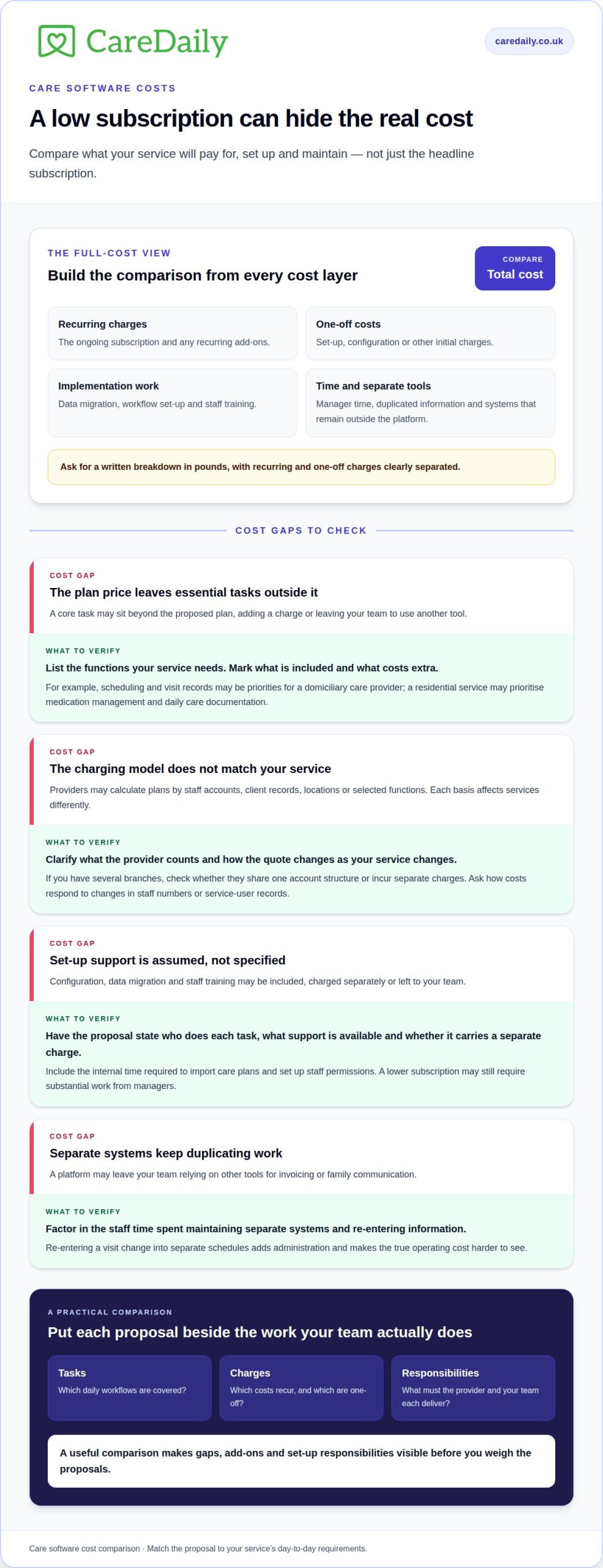
Compare the full cost of each care software option, not just its headline subscription. The total depends on what your service needs, how the provider structures its plans, and which functions are included. A price depends on the case and is given after a quote request; the main cost factors are service size, selected modules, onboarding and any additional support.
Start by matching the proposed plan to your current workflows. A domiciliary care provider may prioritise scheduling and visit records, while a residential service may need medication management and daily care documentation. If a core task falls outside the plan, an add-on could affect its overall value. Request a written breakdown in pounds, with recurring and one-off charges clearly separated.
Check how the provider counts usage. A plan might be based on staff accounts, client records, locations or selected functions, and these models affect services differently. A provider with several branches, for example, should understand whether they share one account structure or incur separate charges. A growing team should also find out how costs change as staff numbers or service-user records increase.
Include implementation in the comparison. The proposal should explain whether configuration, data migration and staff training are included, charged separately or handled by your team. Consider what support is available for importing care plans or setting up staff permissions. A low subscription may still require substantial internal time if essential set-up work is excluded.
- Record each recurring charge and any initial set-up fee in the same comparison.
- List essential functions, then mark which are included and which cost extra.
- Check whether support, training and data migration have separate charges.
- Ask how the quote changes when a service adds staff, clients or locations.
- Include the time managers spend maintaining separate systems in your assessment.
Look beyond the software invoice. If a platform leaves your team using separate tools for invoicing or family communication, factor in the staff time spent duplicating information. Re-entering a visit change into separate schedules, for instance, adds administration and makes the true operating cost harder to see.
At Care Daily, we find that a useful comparison begins with the tasks managers need staff to complete each day. Put those requirements beside each proposal, then identify any gaps, add-ons and set-up responsibilities. If you’re ready to map your requirements into a practical next step, outline your service requirements.
Switching timeline and staff training
Moving between care platforms is easier to manage when records can be exported, mapped and checked before staff rely on them. The work depends on data volume, record formats, workflow set-up and how training fits around care delivery.
Begin with a migration inventory. List the records your service needs in the new system, such as client details, care plans, assessments, visit notes and staff information. Then establish which records can be exported from the current system and how the new platform accepts them. Fields may need mapping: a risk rating, for example, could use different labels in each system.
Separate transferable data from information that needs review. A document may transfer successfully but still need a manager to confirm that it is current and linked to the correct client. Prioritise active care plans, allergies, medication instructions and upcoming visits. Keep a clear process for recording new information during migration so changes made in the outgoing system aren’t missed.
A staged transition can make the work easier to coordinate. Use steps such as these:
- Plan: assign a migration lead and list essential records, workflows and decision-makers.
- Prepare: organise staff and client records, resolve duplicate entries and identify incomplete fields.
- Test: load a sample and compare names, dates, care-plan instructions and attachments against the originals.
- Train: practise everyday tasks in the new system before the team depends on it.
- Review: give staff a route to report missing records or access issues after launch.
Training should match job roles, not just consist of a general software demonstration. Coordinators might practise changing a visit and communicating the change; carers need to find current instructions and record visit outcomes. In a residential setting, staff may need to practise finding a client’s daily records during a shift handover. These exercises expose practical gaps before they affect routine work.
Give staff time to practise on the devices they use. A carer who understands a feature on a desktop may still need guidance finding it on a mobile screen between visits. Short, task-based sessions can focus on a single workflow, such as recording an observation or acknowledging an updated care plan. Managers can check understanding with realistic scenarios, rather than relying on attendance alone.
Set the go-live date around operational pressure points. Avoid combining migration with a rota restructure or major service change if that would leave managers handling several unfamiliar processes at once. Keep authorised staff able to access previous records during the agreed transition, and document which system holds the current version of each record. A named lead can track unresolved migration queries, training needs and corrections through the first review period.
A move is easier to manage when records can be exported, mapped to the new platform and checked before staff rely on them. The work depends on data volume, record formats, workflow set-up and how training fits around care delivery.
Aim defines active staff as people working 16 or more hours a week. This can help teams identify whom to include when planning training around the transition.
Care planning and coordination
Care software supports coordination when care plans, daily records and staff workflows connect around each person. Compare how platforms keep instructions current and make relevant information accessible to the people delivering support.
Which Nourish Care alternatives in the UK integrate with NHS systems, pharmacies and accounting software? Integration varies by platform and connection. Compare each named system, the information exchanged, whether data moves both ways and whether staff must re-enter updates manually.
UK care management software helps providers organise care information and operational workflows. Platforms may support domiciliary care, residential care and other social care settings, with functions tailored to each service’s needs.
For an integration review, distinguish direct connections from other ways of sharing information. A direct connection may transfer selected data between systems, while a file export or import requires a handover step. Manual re-entry creates another task for staff. For each proposed connection, map how an update travels and who acts if the information doesn’t arrive as expected.
Consider a change to a client’s support needs. A coordinator updates the care plan, but the change helps only if the carer can access the current instructions before providing support. Check whether connected systems show the same information or whether staff need to consult another record. For pharmacy workflows, clarify which medication details are exchanged. For accounting software, identify whether the connection covers invoices, payments or another specific task.
Care-planning features also need to suit the setting. In domiciliary care, a coordinator may need a clear view of visits and changes across several clients. In a children’s home, staff may need consistent daily records to support shift handovers. Compare platforms using these real tasks rather than broad claims about coordination.
Review how the software handles plan ownership, updates and communication. Can managers see who amended an instruction? Can staff distinguish the current plan from an older version? Does a change prompt a clear action for the relevant team? These details help address a common operational gap: a plan is updated centrally, but a worker follows an earlier instruction during a visit.
Before choosing, list the systems your service already uses and the information each needs. Then compare platform demonstrations against practical scenarios, including a care-plan change, a pharmacy-related update and an invoice workflow. Note which steps are automatic, which require staff action and where teams need a handover.
To map your service’s care-planning and coordination needs into a practical next step, outline your requirements.
Care Daily
Care Daily brings care management software, digital care planning, staff rostering and a policy and procedure library together to support day-to-day operations. Its platform serves UK providers looking for a connected way to manage care information and staff workflows across their service.
When comparing alternatives, consider whether a system supports the work your team actually does. A coordinator, for example, may need to align a care-plan change with staff schedules, while managers need policies that support consistent practice. Care Daily brings these needs into one platform, helping teams assess software against operational priorities rather than a feature list alone.
If you’re considering a change, contact Care Daily to discuss your service’s requirements and next steps.
Make the next step fit your team
Choosing care software is also an opportunity to clarify how information should move through your service. Identify one routine that causes friction, then assess how a system could support the work from start to finish. A clear operational priority makes comparisons more meaningful.
Bring that priority to a conversation with Care Daily. Discussing your workflows can help you understand how a change could affect staff responsibilities and existing processes before deciding on next steps.
Discuss your care software options with Care Daily and take the next step at a pace that works for your service. A thoughtful decision can give your team a clearer foundation for consistent, person-centred support.
Frequently Asked Questions
How long does switching take?
There’s no fixed switching time; it depends on the records, set-up and staff readiness. Estimate the work by identifying who will lead each stage and agreeing when the new system becomes the main record. Decide how staff should handle an urgent care-plan change during the transition, including where to find the current instructions and who will resolve missing information.
What should UK care providers check before choosing a care software alternative?
Check that the platform fits your service’s operating model, including less routine tasks. Test a scenario such as a last-minute visit change for a client with specific support instructions: can the right staff see the update, and can a manager trace what happened? Clarify who will manage configuration, staff access and ongoing administration so responsibilities remain clear after implementation.
How easy is it to migrate data from Nourish Care to another care software platform?
Migration depends on data volume, record formats, workflow set-up and training. List the records to move, check export and import formats, test a sample against the originals, and review records that may need updating or matching to the correct client.
How do Nourish Care alternatives compare on care planning, eMAR, rostering and compliance features?
Compare plans against the tasks your service needs. Domiciliary providers may prioritise scheduling and visit records, while residential services may need medication management and daily care documentation. Check which functions are included and whether digital care plans and scheduling support clear handovers.
More from the blog
Care home risk assessment software: roles and reviews
A risk assessment should support a person’s safety without unnecessarily restricting their choices. Care home risk assessment software can help staff
Read more →
Compare home care software for real-time access and data security
A familiar system is not automatically the safer choice, and moving to cloud software is not always the right answer. To compare Tagtronics with
Read more →
Which PASS care software alternatives fit your budget?
The best fit depends on your provider’s needs and budget: compare PASS with alternatives such as Care Daily, then weigh up the costs and practical
Read more →