
CoolCare alternatives for UK residential care homes
The best software for one care home may not be the right fit across a group. When assessing CoolCare alternatives for residential care homes, the key is to look beyond a feature list and consider whether the system supports consistent practice across sites without making everyday work harder for staff.
You’re right to weigh practical details alongside care planning. A platform needs to support the way managers and teams actually work, from recording and reviewing care plans to coordinating back-office tasks. For multiple homes, it also matters whether information and processes can be managed clearly across each service.
This guide explains how to compare care planning and operational features, assess usability across roles and evaluate a product demonstration or trial. It also covers how to consider shared oversight for a group without losing sight of each home’s routines and the people receiving care.
Key Takeaways
- Assess whether software can support group-wide oversight while allowing each home to manage its own day-to-day routines.
- Clarify what a demo or trial includes, and use it to test real workflows rather than relying on a feature list.
- Compare digital care planning with the back-office functions your teams need to manage alongside it.
- Consider how easily managers and frontline staff can complete common tasks during a busy shift.
- Care Daily brings residential and nursing care management, digital care planning and a policy and procedure library together in one platform.
Choosing software for multiple care homes
For a group, compare how each platform handles oversight across homes and site-level workflows. Shortlist systems with clearly described staff training, support and mobile access, then test those functions against real shift tasks.
Options for small care homes
A smaller care home may need dependable care management, rostering and payroll records without a complex multi-site setup. List the tasks handled by managers, administrators and senior carers, then compare each system’s access controls and features against those needs.
Software pricing may be based on beds, sites or subscriptions, while setup and migration can affect the overall cost. Request a written breakdown of implementation, support and included features before comparing proposals. Also check whether functions such as GPS clock-in are included, so you can compare the full scope rather than headline prices alone.
For training, support and mobile access, compare stated inclusions rather than assuming every package covers all three. Test a practical workflow: can a senior carer complete a handover on a mobile device and find guidance when a rostering issue arises?
Security, data hosting and backups
Assess how each supplier protects care, staff and payroll records, and how the system supports your organisation’s data-protection responsibilities. Review access controls, user permissions, audit records and data-processing terms before making a decision.
Check where data is hosted, who can access it and how the supplier handles recovery after an outage. A group should understand how records for one home can be restored and what processes support that recovery.
Reviews and ratings
User ratings vary by platform, reviewer and use case, so a single score cannot show whether software suits your care home. Compare recent feedback from managers and frontline staff, focusing on specific comments about rostering, record access, support and everyday usability.
Look for practical examples rather than general praise. A review describing how staff complete a medication round is more useful than an unexplained rating. Check whether feedback comes from one home or a multi-site group, since their reporting and permission needs may differ.
Migration from CoolCare
Moving resident, staff and care records from CoolCare can involve mapping data, checking formats and deciding what to transfer. The work depends on record quality, compatibility and the scope of the migration.
Plan the change around live care routines. Account for current care plans, medication information and staff access, so everyone knows which system holds the working record at each stage. Agree responsibilities, testing and staff training before switching over.
Free trial and demo availability
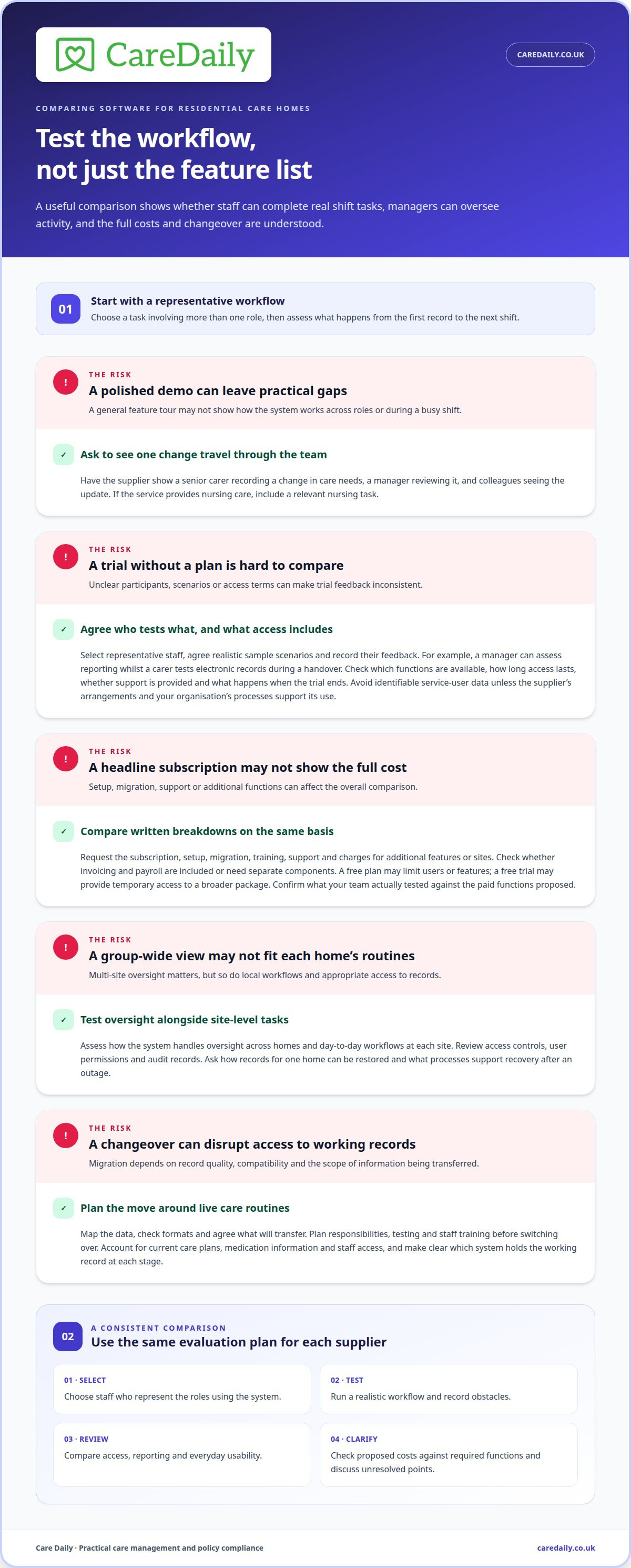
A product demonstration and a free trial answer different questions. A demo shows how a supplier presents its system; a trial lets your team test selected tasks directly. When assessing CoolCare alternatives for residential care homes, compare each option against a typical shift, not just a list of features.
Before a demonstration, choose a workflow that involves more than one role. Ask the supplier to show how a senior carer records a change in care needs, how a manager reviews it and how colleagues see the update. If your service provides nursing care, include a relevant nursing task. This can reveal gaps that a general overview may miss.
A trial is useful when the right staff can test realistic functions. Agree who will take part, which sample scenarios they will use and what feedback they will record. A manager might assess reporting while a carer tests whether electronic records work for a busy handover. Avoid using identifiable service-user data unless the supplier’s arrangements and your organisation’s processes support it.
Free plans and free trials are different. A free plan may limit users or features; a trial may offer temporary access to a broader package. Ask what is included, how long access lasts, whether support is available during testing and what happens when the trial ends. For a consistent comparison of CoolCare alternatives for residential care homes, record these terms alongside each system’s capabilities.
Assess pricing alongside a demonstration or trial. Request a written breakdown of the subscription, setup, migration, training, support and any charges for additional features or sites. Invoicing and payroll may be included or require separate components, so compare the full scope rather than a headline subscription. A trial is most informative when you know which paid features your team tested.
Use the same short evaluation plan for each supplier: select representative staff, test a real workflow, record obstacles, and review the proposed costs against required functions. Keep notes on access, reporting and daily usability, then discuss any unresolved points during a follow-up demonstration. This creates a fair basis for comparing alternatives without assuming every supplier offers the same trial terms. If you’re ready to discuss a suitable next step, get started with Care Daily.
Care planning and back-office features
Choose software that connects care plans with the records and processes staff use on each shift. For a fair comparison, map one person’s journey from assessment and planned support through delivery, review and related administration.
Do not assume every UK care home system offers the same integrations. Compare each supplier’s documented connections with your payroll and accounting systems, eMAR and any NHS systems your service uses. Confirm what information moves between systems and whether staff need to enter it again.
Care plans should give staff clear, current instructions, not simply store assessment information. Test how a change in mobility or eating support is recorded, reviewed and shared with colleagues on the next shift. Check whether updates are traceable and staff can distinguish the current plan from earlier versions.
Medication workflows deserve particular attention in nursing settings. Assess whether the electronic medication administration record supports the rounds staff complete, including recording an omission or a change in circumstances. Compare this with residential care workflows, where staff may need to coordinate care-plan updates and daily records without nursing-specific processes.
Back-office features should reduce duplicate entry between care delivery and administration. Trace a completed shift through timesheets and payroll, then follow an invoice through the relevant approval steps. Check whether managers can resolve discrepancies using linked records instead of switching between separate screens or spreadsheets.
Staff records, training and rostering also affect continuity. Check whether a manager can identify a training need, arrange cover for an upcoming shift and access relevant staffing information in one workflow. For a specialist service, test a less routine scenario, such as recording an individual’s communication approach alongside the day’s support tasks.
For CQC-regulated adult social care in England, care management systems can support audit preparation by organising records and making relevant information accessible. They do not replace the provider’s responsibilities. Compare how each system presents care-plan reviews, incident records, staff training and audit trails, then test whether a manager can retrieve a clear example without piecing it together from separate files.
At Care Daily, we find that feature comparisons become more useful when teams follow one real workflow from beginning to end. A digital care planning workflow can help you assess how plans and assessments fit into day-to-day care, alongside the back-office functions your service needs.
Ease of use
Ease of use is clearest during routine work, not a supplier presentation. Test whether a carer can find the current care plan, record support and leave a clear handover without navigating unrelated screens. When comparing CoolCare alternatives for residential care homes, ask a manager to complete the same task and note whether both roles can find the information they need.
Build the test around a real shift. Imagine a person’s mobility changes before lunch, and staff need to record the update for colleagues taking over later. Follow the entry through the system: can the right person find it, understand what changed and identify the current instruction? This reveals practical friction that feature names alone cannot show.
Consider the people using the system, including staff with different levels of digital confidence and responsibilities. A nursing home may need nurses to record clinical information while carers document daily support. Assess whether each role can find relevant tasks without unnecessary steps or confusing screens. Compare the same workflow across homes, particularly when local routines differ.
Menus, labels and search functions affect how quickly staff find records during busy periods. Test common actions such as locating a care plan, recording a completed task and correcting an entry. If enquiries or occupancy changes are handled in the platform, test those processes too. A clear route to the right record matters more than a crowded dashboard.
Assess mobile access in practice. Ask staff to complete a short sequence on the device they use at work: open a person’s record, check instructions and document an update. Notice whether small-screen navigation interrupts the task. A system that feels straightforward at a desk may work differently during handover or in a large building.
Use a consistent method to compare alternatives: give managers and frontline staff the same task, then note where they pause, repeat an action or need help. Ask what would make the workflow easier instead of treating speed as the only measure. A person-centred system should help staff find relevant information while keeping their attention on the individual receiving care.
If you’re ready to take the next step after assessing usability, explore getting started.
Care Daily: Care Home Management Software
Care Daily provides care management software for residential and nursing homes, bringing day-to-day records and digital care planning into one platform. Its Care Homes Edition helps teams connect care delivery with the management work behind it.
Digital care planning helps staff access and update individual plans, while the Policy & Procedure Library gives managers policies, procedures, forms and templates for governance and operational guidance. These tools can support providers reviewing how their homes organise care information and management processes. Consider them together when you need care planning and policy resources as part of care management software.
If you’d like to discuss whether Care Daily fits your homes, contact Care Daily.
Choose a system that supports the care you want to deliver
When assessing CoolCare alternatives for residential care homes, look beyond the changeover itself. Choose a system that supports how your teams want to work as services develop, while keeping day-to-day care focused on each person. Identify which processes need clarifying, where staff need easier access to information and how managers will support consistent practice across homes. These priorities help decision-makers compare systems against their operational needs.
Care Daily brings care management software together with a Policy & Procedure Library and Digital Care Planning. These services can help you assess how care records, planning and governance resources fit into your approach. The right choice is one your teams can use confidently and that supports your organisation’s priorities.
Discuss how Care Daily could fit your requirements. Contact Care Daily to discuss your needs, and take the next step at a pace that works for your organisation.
Frequently Asked Questions
Which CoolCare alternatives offer staff training, customer support, and mobile access?
Shortlist systems with clearly stated staff training, support and mobile access, then test those inclusions against real shift workflows.
How much do CoolCare alternatives cost in the UK, including setup and per-bed fees?
Pricing may be per bed, per site or subscription-based, with setup and migration potentially charged separately. Request a written breakdown of implementation, support and optional features.
How do CoolCare alternatives compare on care planning, rostering, medication, and compliance features?
Compare how care plans are recorded, reviewed and updated; how rostering and staff records support daily work; and whether medication functions suit the service, including eMAR for nursing settings. For compliance preparation, check access to care-plan reviews, incident records, staff training records and audit trails.
Frequently asked questions
Which CoolCare alternatives offer staff training, customer support, and mobile access?
Shortlist systems with clearly stated staff training, support and mobile access, then test those inclusions against real shift workflows.
How much do CoolCare alternatives cost in the UK, including setup and per-bed fees?
Pricing may be per bed, per site or subscription-based, with setup and migration potentially charged separately. Request a written breakdown of implementation, support and optional features.
How do CoolCare alternatives compare on care planning, rostering, medication, and compliance features?
Compare how care plans are recorded, reviewed and updated; how rostering and staff records support daily work; and whether medication functions suit the service, including eMAR for nursing settings. For compliance preparation, check access to care-plan reviews, incident records, staff training records and audit trails.
More from the blog
Compare care software pricing, quotes and switching time
Compare Access Workspace for Care alternatives and pricing, and assess annual costs, tailored quotes, workflows and onboarding before switching care software.
Read more →
Access Care Planning alternatives: compare features and flexibility
Compare Access Care Planning alternatives UK for flexibility, digital plans, integration and practical criteria to find the right fit for your care services.
Read more →
Care home risk assessment software: roles and reviews
A risk assessment should support a person’s safety without unnecessarily restricting their choices. Care home risk assessment software can help staff
Read more →