
Compare care software pricing, quotes and switching time

The lowest annual price isn't always the simplest choice if your team still has to join up records, rotas and compliance work across separate systems. A comparison of Care Daily alternatives and pricing should look beyond the headline quote to how each option fits your services and day-to-day processes.
Choosing one platform or several products is a practical decision, not just a software preference. Separate tools may suit a defined need, while an integrated system can bring key workflows together. The right fit depends on what your organisation needs to manage.
This guide explains how to compare system choices, annual pricing and personalised quotes, and what can affect onboarding and switching. It also covers the operational details that matter in care, such as keeping domiciliary visits on schedule while staff learn a new system.
Key Takeaways
- Compare an all-in-one system with separate products by looking at how well each supports your workflows, not just the number of tools.
- Check whether annual pricing is based on carers, beds or another measure, and consider how that basis fits your service.
- A personalised quote reflects the scope of the system and your organisation’s requirements, so compare what each proposal covers.
- Switching time depends on practical onboarding needs, including data migration and the work involved in bringing staff onto a new system.
- Care Daily brings care management, digital care planning, staff rostering and policy resources together for providers seeking a more connected approach.
Comparing separate products with one system
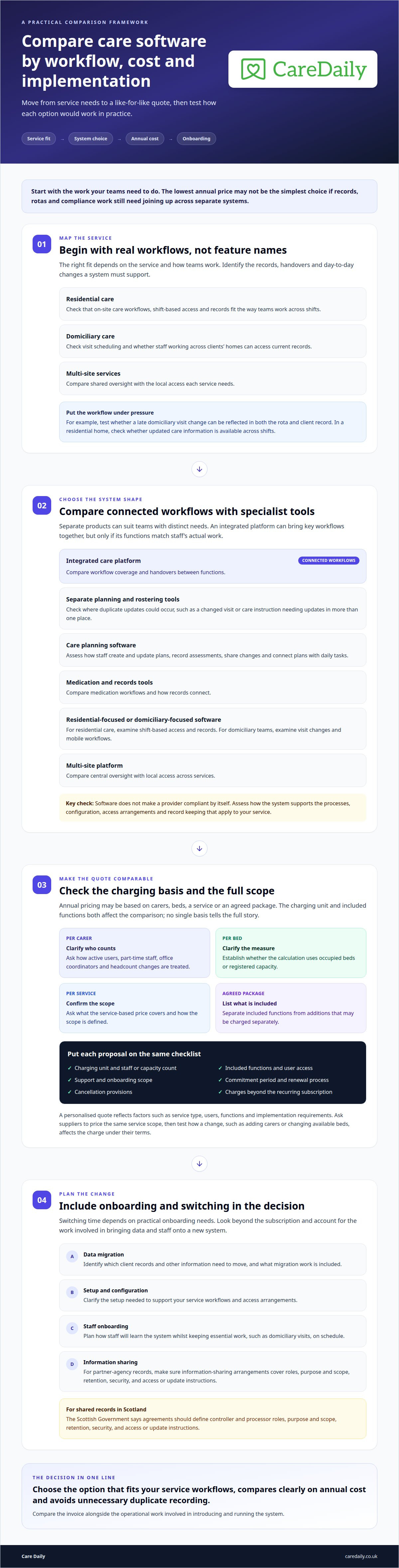
Residential care homes usually need records and workflows built around on-site care. Domiciliary agencies need visit scheduling and accessible records for staff working across clients’ homes. Multi-site providers should compare shared oversight and local access. The right fit depends on the service and how teams work.
Access Workspace for Care is a care-sector software option. To compare its care-planning features, assess how staff create and update plans, record assessments, share changes and connect plans with daily tasks. These are comparison criteria, not claims about specific Access package features.
Neither Access Workspace for Care nor an alternative makes a provider compliant by itself. UK data protection and care requirements depend on the provider’s processes, system configuration, access arrangements and record keeping. Compare how each system supports those processes, then assess it against the obligations that apply to your service and nation.
Separate products can work well when each has a clear role, such as one tool for care planning and another for rostering. The challenge is keeping information in sync: a changed visit or care instruction may need updating in multiple places. A single system can reduce duplication, but only if its functions match staff’s actual work.
For example, a domiciliary coordinator may need a late visit change reflected in both the rota and the client’s record. In a residential home, the key test may be whether updated care information is available across shifts. Test each workflow with a realistic scenario, rather than comparing feature names alone.
| Option | Potential fit | Compare |
|---|---|---|
| Integrated care platform | Providers seeking connected workflows | Coverage and handovers |
| Separate planning and rostering tools | Teams with distinct systems | Duplicate updates |
| Care planning software | Services prioritising digital plans | Assessments and plan reviews |
| Medication and records tools | Teams comparing medication workflows | How records connect |
| Residential-focused software | Care homes | Shift-based access and records |
| Domiciliary-focused software | Community teams | Visit changes and mobile workflows |
| Multi-site platform | Organisations with several services | Central oversight and local access |
For partner-agency records, the Scottish Government says agreements should define controller and processor roles, purpose and scope, retention, security, and access or update instructions. These details matter when choosing separate software to share information across organisations.
Record the annual fee basis, included functions and onboarding scope in one comparison; the pricing information provides a useful reference point for structuring that review. Choose the option that fits your service workflows and avoids unnecessary duplicate recording.
Annual pricing per carer or per bed
UK care software may be priced by carer, bed, service or agreed package. The annual total depends on the charging basis and included functions, so compare the same service scope before weighing quotes. A per-carer model links the bill to staff numbers; a per-bed model links it to a home’s capacity. Neither basis gives the full picture on its own.
For a domiciliary care agency, clarify which staff count applies. It may refer to active software users or another agreed measure, so establish how the supplier counts part-time staff, office coordinators and changes in headcount. A residential provider should find out whether the calculation uses occupied beds or registered capacity. These definitions can change the comparison.
What are the prices and contract terms for alternative UK care management software? Annual charges vary by pricing model, service scope and selected functions, so a quote is needed for a meaningful figure. Contract terms also vary. Review the commitment period, renewal process, cancellation provisions and any charges beyond the recurring subscription.
Compare the annual fee with the practical work involved in introducing the system. A provider moving staff rotas and client records, for example, may need to plan data migration, setup and staff training alongside the subscription. A lower headline fee may cover fewer functions, while a broader package may reduce the need for separate tools. Consider both the invoice and the operational workload.
Use a like-for-like comparison. Record the charging unit, included modules, user access, support, onboarding scope and contract conditions for each proposal. Then test a realistic change, such as a domiciliary agency adding carers or a care home changing its available beds. Ask how that change affects the annual charge under each supplier’s terms.
- Per carer: clarify which staff members count and how changes in team size are handled.
- Per bed: establish whether pricing uses occupied beds or registered capacity.
- Package-based: list included functions and any separately charged additions.
- Contract: note the commitment, renewal, cancellation and onboarding conditions.
At Care Daily, we find that the charging unit matters most when an organisation’s workforce or capacity changes. A provider should compare a stable annual cost against the operational flexibility it needs, rather than choosing by headline price alone. Use a structured quote request to set out the service scope and pricing basis clearly.
Case-by-case pricing and personalised quotes
A personalised quote reflects the work your care service needs the software to support. The figure is based on factors such as service type, users, functions and implementation requirements. Different providers may need different configurations, even when they deliver similar services. When comparing Access Workspace for Care alternatives and pricing, assess each proposal against your organisation’s actual requirements.
Start by describing your service structure. Explain how teams are organised, which staff need access and how managers oversee daily work. For domiciliary care, describe how coordinators and carers use systems across office and community work. These details help define a proposal that fits your operations.
Next, identify the workflows you want covered. One provider might need digital care records, staff rostering and medication administration in one platform. Another may want to replace only its care-planning software. A quote can reflect the required functions instead of assuming every service needs the same package.
Implementation also affects the scope. Data migration, setup and staff training may vary depending on how much information needs transferring and its current format. A provider moving current client records but keeping older files in an archive has a different migration scope from one transferring both. Describe your existing setup and which records need to move.
- Service model: explain the type of care you provide.
- Organisation structure: outline teams and the staff who need access.
- Required workflows: distinguish essential functions from possible later additions.
- Transition scope: describe the records and processes involved in switching.
When comparing proposals, match each function to a named operational need. If one quote includes rostering and another does not, they are not directly comparable. Note assumptions about users, locations, data transfer and training. This helps managers understand what each package covers and where proposals differ.
For example, a provider might ask for active records to be transferred first, with archived files excluded from the initial migration. State that boundary clearly so the quote reflects the intended work. A comparison of Access Workspace for Care alternatives and pricing is more useful when every proposal uses the same scope.
Before deciding, summarise the agreed scope, subscription basis, contract terms and onboarding responsibilities in writing. This gives managers a practical basis for budget planning and helps prevent a mismatch between the quoted system and everyday work.
Switching timeline and onboarding
UK care providers should map data, workflows, staff training and changeover arrangements before switching software. The schedule depends on how much information needs moving, its condition and the teams involved. Transferring care plans, rotas and medication records requires different preparation from moving a single workflow.
Start with the records in your current system. Identify which client files, assessments, care plans, staff details and historical entries need transferring. Then establish how to export and organise them. Missing fields or inconsistent naming can create extra reconciliation work, especially when teams record the same information differently.
Map the everyday tasks that must continue during the changeover. For a domiciliary team, these may include publishing visits and sharing late rota changes. In a care home, staff need current plans available across handovers. Include medication rounds and incident recording if they are part of the system change.
- Set the scope: list services, locations, users and records included in the move.
- Assign ownership: name the people responsible for data, configuration and staff communication.
- Prepare records: agree which information transfers and how teams will resolve errors.
- Plan training: schedule role-based sessions for managers, coordinators and frontline staff.
- Agree cutover: define when staff begin using the new system and where they record changes during transition.
Test real workflows, not just a demonstration. Ask a coordinator to update a visit, then confirm the change appears where staff need it. In a residential service, check whether the next shift can access a revised care plan. These tests can reveal gaps before the new process becomes routine.
Staff training should reflect different roles. Managers may need to review permissions and reports, while carers need clear steps for viewing records and entering updates. A short reference guide can help staff handle common tasks during early use. Identify who will answer operational questions on each shift.
Keep a fallback process for essential records during the changeover. Agree who can access the previous system, how urgent updates will be recorded and how they will be reconciled afterwards. This is particularly useful if a scheduled visit changes after the rota has been transferred.
Careful preparation makes the transition easier to manage. Plan your software transition around your records, workflows and staff training needs.
Care Daily
Care Daily gives UK care providers an alternative when they want connected software for day-to-day management. Its care management software brings digital care planning, staff rostering and a policy and procedure library into one platform, helping teams assess whether key workflows can sit together.
When comparing annual pricing and quotes, consider how a system’s functions fit your service rather than judging a proposal by its headline cost alone. For example, assess whether care plans and rotas support the way your teams organise work across shifts or community visits.
If you’re considering a change, contact Care Daily to discuss your organisation’s requirements.
Choose a system that supports your next stage
Your evaluation of Access Workspace for Care alternatives and pricing is most useful when it leads to a decision your teams can put into practice. Consider how the chosen system will support changing service needs, staff responsibilities and consistent records, not just the initial transition. It should fit the way your organisation delivers care now and where it plans to go.
Before moving ahead, agree who will own the decision and how managers, coordinators and frontline staff will contribute. Their day-to-day perspectives can show whether proposed workflows make sense beyond the implementation plan. Care Daily is one option to assess against your operational requirements.
If you’re ready to discuss what your organisation needs from a care management platform, talk to Care Daily. A clear understanding of your priorities gives you a practical foundation for the next step.
Frequently asked questions
How should care providers compare user access between systems?
Compare what each role can view and update, using a specific example from your service. For instance, consider whether a carer needs access to a client’s current plan without access to management reporting or colleagues’ records. Ask how permissions are assigned and changed when responsibilities shift. This helps managers assess whether access supports appropriate day-to-day work, rather than relying on a general claim about role-based permissions.
How do Access Workspace for Care and its alternatives compare on rostering, care planning, finance and compliance?
Compare care planning and rostering by testing how each option handles real workflows and handovers: an integrated system may reduce duplicate updates, while separate tools may suit distinct needs. Neither system ensures compliance by itself; assess how it supports your processes and record keeping. Finance is not covered.
Frequently asked questions
How should care providers compare user access between systems?
Compare what each role can view and update, using a specific example from your service. For instance, consider whether a carer needs access to a client’s current plan without access to management reporting or colleagues’ records. Ask how permissions are assigned and changed when responsibilities shift. This helps managers assess whether access supports appropriate day-to-day work, rather than relying on a general claim about role-based permissions.
How do Access Workspace for Care and its alternatives compare on rostering, care planning, finance and compliance?
Compare care planning and rostering by testing how each option handles real workflows and handovers: an integrated system may reduce duplicate updates, while separate tools may suit distinct needs. Neither system ensures compliance by itself; assess how it supports your processes and record keeping. Finance is not covered.
More from the blog

Access Care Planning alternatives: compare features and flexibility
Compare Access Care Planning alternatives UK for flexibility, digital plans, integration and practical criteria to find the right fit for your care services.
Read more →
Care home risk assessment software: roles and reviews
A risk assessment should support a person’s safety without unnecessarily restricting their choices. Care home risk assessment software can help staff
Read more →
Compare home care software for real-time access and data security
A familiar system is not automatically the safer choice, and moving to cloud software is not always the right answer. To compare Tagtronics with
Read more →