
Paperless children's home: reduce admin, protect data and save space
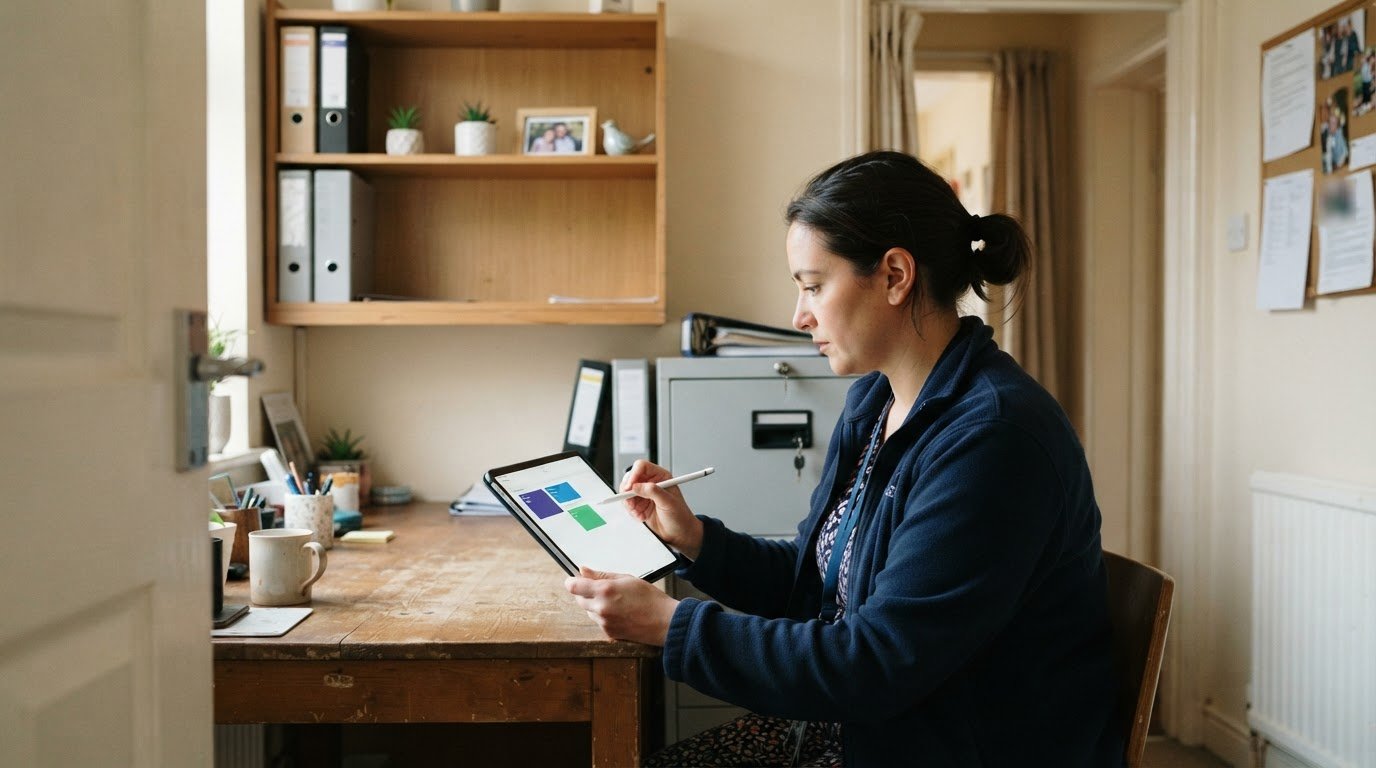
When a child’s records are spread across files, folders and staff handovers, finding the right information quickly can become a challenge. In a children’s home, that can make it harder to keep records current and ensure staff can access what they need to support each child’s day-to-day needs.
Going paperless doesn’t mean removing records. Digital records can reduce time spent handling paperwork and make information easier to organise, update and access. They can also help teams manage access to personal information and reduce the space used for paper files, while recognising that some documents may still need to be retained or handled on paper.
Key Takeaways
- Map the recurring paperwork and follow-up tasks that take staff away from supporting children, then identify which records could be managed digitally.
- Use clear access permissions and consistent record-keeping practices to help protect sensitive information and make it easier for authorised staff to find what they need.
- Review which forms and documents genuinely need printing; reducing unnecessary copies can cut paper use without changing essential record-keeping practices.
- Plan how existing paper files will be organised, digitised and stored so the transition frees office space without losing a clear record trail.
- Consider how digital records fit the needs of your setting, including handovers, access to current information and the different routines of children’s homes and supported accommodation.
1. Reducing staff administration and follow-up
A paperless children’s home can reduce the time staff spend copying information between records. The practical benefit comes from having a clear process for recording, reviewing and following up tasks. For example, a handover note about a school meeting can sit alongside the child’s current plans, rather than in a separate folder the next shift has to find.
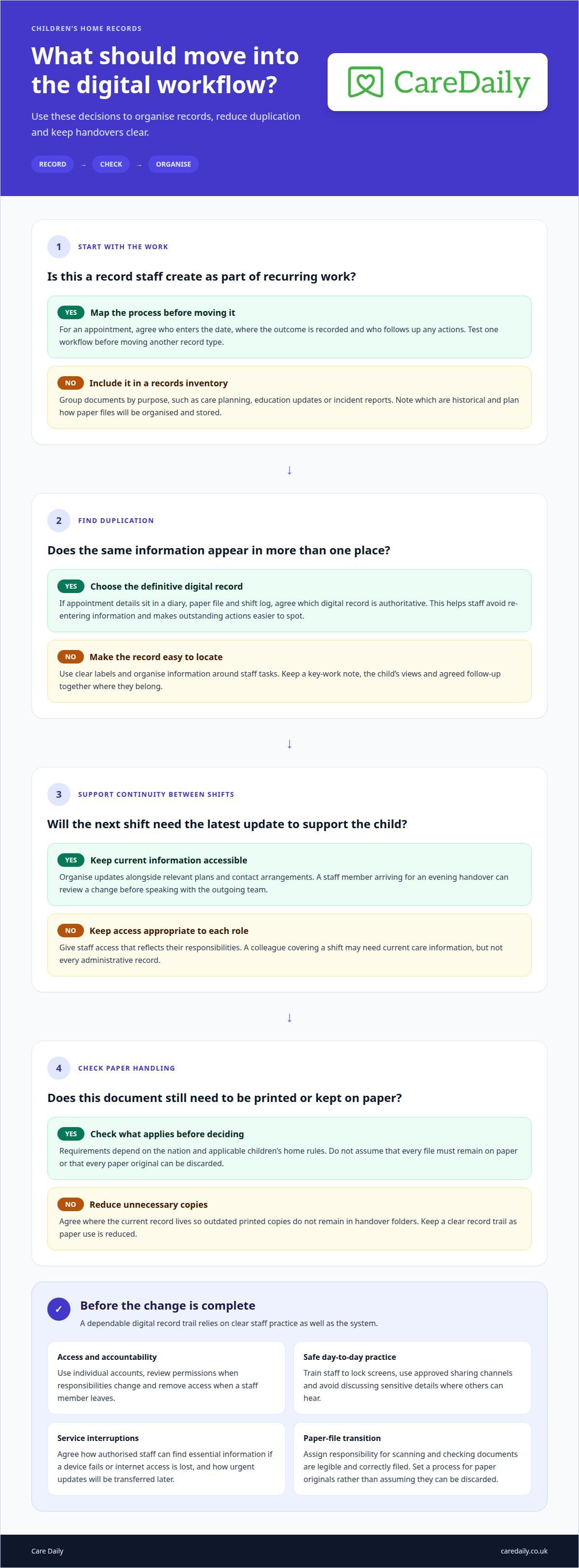
Start by mapping a common process, such as recording an appointment. Identify who enters the date, where staff record the outcome and who follows up agreed actions. If the same details appear in a diary, paper file and shift log, decide which digital record is the definitive one. A consistent process helps staff avoid re-entering information and spot outstanding actions.
Next, organise records around the work staff actually do. A key-work session might generate a note, the child’s views and an agreed follow-up. Recording these together gives the next staff member useful context without making them piece information together from separate documents. Clear labels for actions, owners and due dates help managers distinguish outstanding tasks from completed records.
Digital access can support continuity between shifts. A staff member arriving for an evening handover, for example, can review a recent update before speaking with the outgoing team. The colleague handing over can then focus on relevant changes instead of reading through a full paper file. This is especially useful when plans, appointments or contact arrangements have changed during the day.
Training should cover how staff enter information, find current records, assign follow-up actions and correct errors. Use realistic scenarios, such as recording a school call or sharing an appointment change, and let each role practise its part. Explain how to handle access problems or urgent updates so staff can maintain a reliable handover.
A staged transition can make the change manageable. Start with one workflow, such as appointments, and test it with staff from different shifts. Ask where information was duplicated, which labels caused confusion and whether the next action was clear. Refine the process before moving another record type, such as key-work notes or contact summaries, into the digital workflow.
Keep a brief implementation log of decisions, completed training and unresolved issues. Managers can use it to see whether staff follow the same recording process and whether recurring tasks are still being chased through separate messages. The goal is not simply to use fewer paper forms. It is to create a dependable record trail showing what happened, what remains to be done and who is responsible.
2. Protecting personal data and reducing GDPR risks
Children’s homes can use digital records across England, Scotland, Wales and Northern Ireland, but digital formats alone do not show whether record-keeping meets applicable requirements. The regulator for children’s services varies by nation: Ofsted in England, the Care Inspectorate in Scotland, Care Inspectorate Wales (CIW) in Wales and RQIA in Northern Ireland.
Useful digital records include placement information, care plans, daily logs, education updates, behaviour records, safeguarding information and contact arrangements. Organise them so staff can find the relevant child’s information without searching unrelated folders. For example, an education meeting record should be easy to find alongside the child’s education information and any agreed actions.
Give staff individual accounts and permissions that reflect their roles. A colleague covering a shift may need current care information, but not every administrative record. Review permissions when responsibilities change and remove access when a staff member leaves. Individual accounts also help managers identify who made a record or update.
Staff practice matters as much as system settings. Train the team to lock screens when leaving shared work areas, avoid discussing sensitive details where others can hear and use approved channels to share information. A handover in a busy office, for example, could expose a child’s details if records are left visible to visitors or colleagues without a work-related need.
Plan for service interruptions before they happen. Agree how authorised staff can find essential information if a device fails or internet access is lost. Set out how to record urgent updates temporarily and transfer them to the appropriate record when access returns. Include night and relief staff so the process works across shifts.
Decide who oversees backups and how the home would restore records after accidental deletion, equipment failure or another technical incident. Staff should know whom to alert if an account appears compromised or a record is missing. A brief disruption log can help managers track what happened, which information was affected and what follow-up remains.
When digitising paper files, assign responsibility for scanning and checking that each document is legible and correctly filed. Set a clear process for handling paper originals rather than assuming a scan means they can be discarded. A planned transition to digital records management can bring access, staff procedures and continuity planning into one coherent process, with children’s privacy at its centre.
3. Reducing printing costs and paper use
A digital record can reduce printing, but it doesn’t determine which documents your home must retain. Requirements depend on the nation and applicable children’s home rules. Organise records so Ofsted in England, or the relevant inspector elsewhere, can access them. Don’t assume every file must stay on paper or that every paper copy can be discarded.
To move from paper records to a digital system, start with an inventory. Group documents by purpose, such as care planning, daily notes, education updates, medication records and incident reports. Then identify which records staff create regularly and which are historical. A phased transition lets the team test one record type before changing several workflows at once.
Printing often continues because staff aren’t sure which copy is current. A printed care plan, for example, may remain in a handover folder after its digital version changes. Agree where the authoritative record lives, how staff find it and when a paper copy is genuinely needed. Stop routinely printing drafts and duplicates when the approved digital record is accessible to the people who need it.
Review printing where it happens. Check whether meeting notes, shift summaries or routine checklists are printed for convenience, then identify a digital way to record and view them. For example, staff preparing a handover can use the current record instead of printing several updates for colleagues to reconcile. Define any paper process that remains necessary.
For existing files, prioritise records staff need for current care and day-to-day decisions. Scan documents in manageable batches, use consistent file names and check that each scan is legible and stored against the right child. A scanned contact note filed under the wrong record is difficult to retrieve and can cause confusion. Assign someone to check the index before staff rely on the digital copy.
Don’t shred originals just because they’ve been scanned. First establish the applicable retention requirements and operational need for each record type. Keep a clear log of what was digitised, where it is stored and how the paper original was handled. This gives managers a traceable process when someone needs an older document or wants to understand a record’s history.
Measure progress using practical indicators, not assumed savings. Track which forms still go to the printer, why staff need them and whether a digital alternative works during busy handovers. A home may need a hybrid process in specific situations. The aim is to remove unnecessary printing without making records harder to use or inspect.
Keep records needed for current care and day-to-day decisions, such as care plans, daily notes, education updates, medication records and incident reports, in a form staff and inspectors can access. Whether paper originals must be retained depends on applicable requirements and operational need. Scanning alone is no reason to discard them.
4. Saving office space
Filing cabinets can take over rooms intended for staff planning, meetings or record-keeping. A digital transition can free up space, but only if staff organise files before moving them. Start with a simple office map: identify cupboards holding active records, archive boxes and documents staff rarely retrieve.
Separate current working files from older material. A child’s active plans and recent notes need a different retrieval process from closed records. Label each group by purpose and date range, then assign someone to decide what needs scanning, secure storage or continued paper access. This prevents a rushed clear-out from making important records harder to find.
Plan the work around a defined filing area rather than emptying every cabinet at once. Start with one archive cupboard, for example, sort its contents into clear categories and record where each group will go. Staff can continue routine work while those records are reviewed, instead of having papers spread across shared desks and meeting spaces.
Instruction manuals can also occupy shelves long after equipment changes. In a children’s home, identify which manuals relate to equipment still in use, such as a kitchen appliance or safety system. Keep useful information accessible, and handle obsolete copies through the home’s agreed process. A clear distinction between current and outdated material makes shelves easier to maintain.
Scanning alone won’t create usable space. Use consistent file names that include the record type and relevant date, then store each scan in the correct restricted location. A signed school document, for example, should be retrievable from the child’s records, not buried in a folder labelled “miscellaneous”. Check that it is legible and correctly filed before moving the paper original.
Plan where things will go before clearing shelves. Decide which cabinets will remain for records that still need paper handling and which space can be repurposed for staff use. Keep an inventory of archived material, its location and who is responsible for retrieval. This helps managers find older records during a review or inspection.
Review the space after each batch. If a cabinet remains full, check whether staff are printing duplicates or keeping documents without a clear retrieval purpose. Keep essential materials accessible rather than aiming for an empty office at any cost. To bring records and workflows together as you plan a transition, use [INTERNAL LINK: a digital care management approach] as a starting point.
Care Daily: Children’s Homes & Supported Care Software
Care Daily provides Children’s Homes & Supported Accommodation Care Management Software to bring records and operational processes into one digital system. Digital care planning helps staff access current plans and assessments, while the Policy & Procedure Library helps managers organise relevant procedures alongside day-to-day care management.
Care Daily helps teams bring connected processes into a digital workspace. The platform can suit a setting where staff manage care information across separate paper files and digital records, or are planning a structured move towards paperless working.
If you’re considering how a digital approach could fit your children’s home, [INTERNAL LINK: contact Care Daily to discuss] the next step.
Build a digital approach around the home’s routines
A paperless children’s home works best when digital processes support the everyday experiences of staff and children. Before making further changes, bring together people with different perspectives on the daily routine, including staff working nights, handling appointments or supporting transitions between placements. Their insights can reveal practical needs that are easy to miss from an office-based perspective.
Use those conversations to decide what information staff need to find during a shift and how the system can support respectful, person-centred recording. Keep the child’s privacy and dignity central when agreeing who can access information and how staff discuss sensitive details. A useful test is whether the process gives staff clearer context without adding unnecessary steps.
Choose a next step that feels achievable for your team, then learn from how it works in practice. If you’d like to explore a digital approach for your setting, contact Care Daily to discuss. Thoughtful changes can make records work better for the people who rely on them.
Frequently Asked Questions
What does “paperless children’s home” mean in the UK?
A paperless children’s home uses digital systems as the main way to create, store and retrieve operational records, rather than relying on paper files. Some homes may still use paper for specific tasks or retain original documents. Distinguish between records created digitally and paper documents scanned into a system: both need clear filing, access and retrieval processes.
What are the benefits and risks of going paperless in a children’s home?
Digital records can help staff find current information and avoid duplicate entries, but poorly managed access or processes create practical risks. A misplaced permission setting, for example, could stop the incoming shift from seeing an essential update. Unclear file names, duplicate records and staff unfamiliarity can also undermine the benefits. Plan for training, access problems and reliable record retrieval.
Which software platforms are used by UK children’s homes, and how do they compare?
Children’s homes may use dedicated care-management platforms, general document systems or separate tools for individual tasks. Compare how each option supports children’s home workflows, such as placement information, daily recording, care planning and evidence retrieval. Care Daily offers Children’s Homes & Supported Accommodation Care Management Software, alongside Digital Care Planning and a Policy & Procedure Library. Consider whether an integrated approach suits your team’s processes.
What UK GDPR, data protection and cybersecurity rules apply to digital records in children’s homes?
Personal information needs careful handling whether it is held in digital records or on paper. Protect records with role-appropriate access, accurate and relevant entries, controlled sharing and a clear approach to retention and disposal. Staff should know how to report suspected unauthorised access or lost devices, and managers should understand how to review access and record changes.
What records must a UK children’s home retain on paper or make available to Ofsted or other inspectors?
Organise placement information, care plans, daily logs, education updates, behaviour and safeguarding records, and contact arrangements so the relevant inspector can access them. Whether paper originals must be retained depends on the applicable national requirements and the type of record.
Frequently asked questions
What does “paperless children’s home” mean in the UK?
A paperless children’s home uses digital systems as the main way to create, store and retrieve operational records, rather than relying on paper files. Some homes may still use paper for specific tasks or retain original documents. Distinguish between records created digitally and paper documents scanned into a system: both need clear filing, access and retrieval processes.
What are the benefits and risks of going paperless in a children’s home?
Digital records can help staff find current information and avoid duplicate entries, but poorly managed access or processes create practical risks. A misplaced permission setting, for example, could stop the incoming shift from seeing an essential update. Unclear file names, duplicate records and staff unfamiliarity can also undermine the benefits. Plan for training, access problems and reliable record retrieval.
Which software platforms are used by UK children’s homes, and how do they compare?
Children’s homes may use dedicated care-management platforms, general document systems or separate tools for individual tasks. Compare how each option supports children’s home workflows, such as placement information, daily recording, care planning and evidence retrieval. Care Daily offers Children’s Homes & Supported Accommodation Care Management Software, alongside Digital Care Planning and a Policy & Procedure Library. Consider whether an integrated approach suits your team’s processes.
What UK GDPR, data protection and cybersecurity rules apply to digital records in children’s homes?
Personal information needs careful handling whether it is held in digital records or on paper. Protect records with role-appropriate access, accurate and relevant entries, controlled sharing and a clear approach to retention and disposal. Staff should know how to report suspected unauthorised access or lost devices, and managers should understand how to review access and record changes.
What records must a UK children’s home retain on paper or make available to Ofsted or other inspectors?
Organise placement information, care plans, daily logs, education updates, behaviour and safeguarding records, and contact arrangements so the relevant inspector can access them. Whether paper originals must be retained depends on the applicable national requirements and the type of record.
More from the blog
PASS everyLIFE alternatives: match digital records to care needs
Compare PASS everyLIFE alternatives for digital social care records by assessing workflows, service user needs, infrastructure and person-centred care.
Read more →
Which care planning system fits your home’s needs?
Compare CareDocs alternatives care planning software UK providers can assess for compliance, care plan clarity, reporting and fit across service settings.
Read more →
Cura Systems alternatives for UK care homes
Compare Cura Systems alternatives care homes can use, with guidance on workflows, records, migration and usability for residential, nursing and complex care.
Read more →