
The busiest-looking rota isn’t necessarily the one that gives your team the clearest view of care. In a Birdie versus CarePlanner comparison for care scheduling, focus on how each system connects care plans, rotas, visit records and payments, and handles changes to rosters and shifts.
It’s understandable to start with scheduling: coordinators need to cover visits, respond to changes and keep information accessible to the people delivering care. But the right fit also depends on what happens around each visit, from planned support to the record completed afterwards and the payment process.
This comparison looks at those links and how roster updates work in day-to-day operations. We’ll cover the details to assess against your service’s workflows, so you can decide based on how your team organises and delivers care.
Key Takeaways
- Compare how each platform links care plans, rotas, visit records and payment workflows, rather than judging scheduling in isolation.
- Assess how roster and shift changes are handled, including what coordinators and carers need to know when a visit changes.
- Use your service’s day-to-day workflows to judge which Birdie scheduling features are the better fit for your team.
- Consider CarePlanner’s scheduling functions against the same practical criteria to make the comparison more useful.
- Explore how care management software, digital care planning and staff rostering could support wider operational needs.
Connecting care plans, rotas, visit records and payments
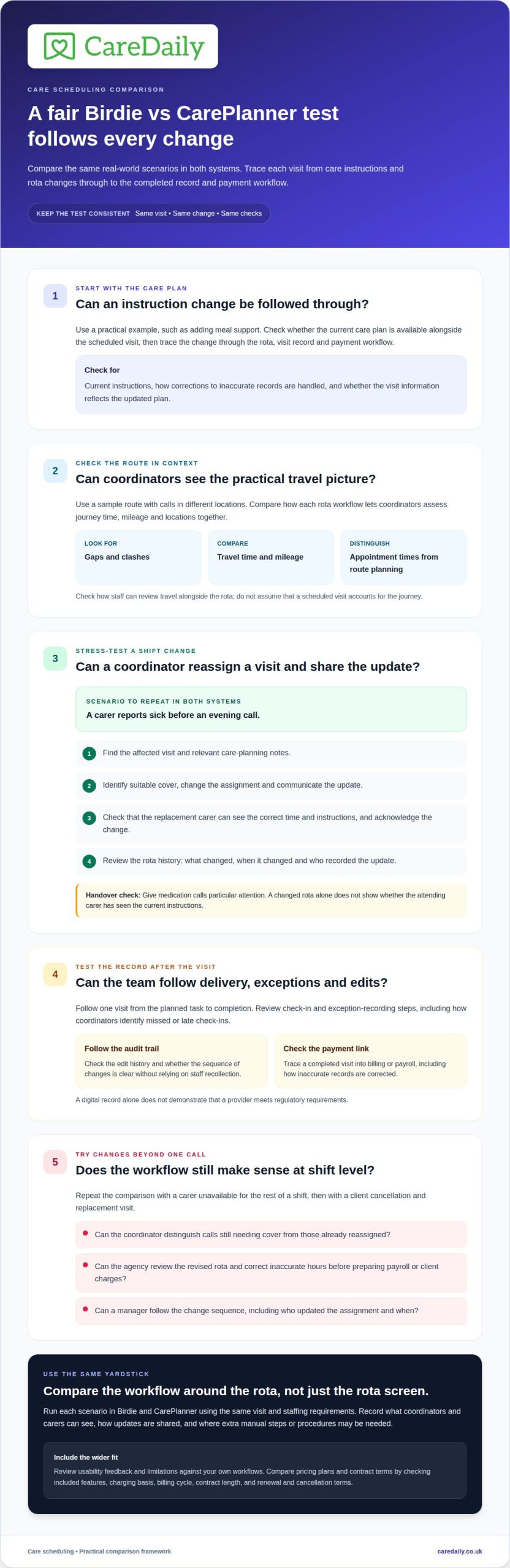
Compare Birdie and CarePlanner across the entire visit workflow, not just the rota screen. A Birdie vs CarePlanner for care scheduling review should follow a planned task through to the visit record and payment process.
Care plans and rota connections
Check whether the client’s current care plan is available alongside the scheduled visit. Then trace a change, such as adding meal support, through the rota, visit record and payment workflow. Compare how each platform displays current instructions and handles corrections to inaccurate records. Use the same example in both systems to reflect your team’s real handovers.
Travel time, mileage and efficient scheduling
Compare how coordinators account for travel time and mileage when assigning visits. Test a sample route with calls in different locations, then look for gaps, clashes and travel details. A Birdie vs CarePlanner for care scheduling comparison should distinguish appointment times from practical route planning. Check how staff can review travel alongside the rota.
Birdie and CarePlanner support travel and geographically efficient scheduling only insofar as their rota workflows let coordinators assess journey time, mileage and locations together. Compare those fields using the same sample route, rather than assuming that a scheduled visit accounts for travel.
| Platform | Care plan and rota | Visit record and payment | Verification and monitoring |
|---|---|---|---|
| Birdie | Trace a plan change into the scheduled visit. | Follow a completed visit into billing or payroll. | Review check-in and exception-recording steps. |
| CarePlanner | Trace the same plan change and visit. | Follow the same record into payment workflows. | Review equivalent verification and monitoring steps. |
Choose the platform that gives coordinators the clearest end-to-end record for their visit patterns.
Test how client and visit data updates by changing an instruction, then checking the rota and care records. See how carers access relevant client details in the app, how check-ins are verified, and how coordinators identify missed or late check-ins. For example, after a visit changes, staff should be able to find the current instructions and see what was updated.
For UK providers, assess how each system records care delivery and supports an audit trail relevant to CQC inspection. Follow one visit from the planned task to completion, including any edit history. A digital record alone does not demonstrate that a provider meets regulatory requirements.
User reviews and limitations depend on how each platform fits a service’s workflows. Look for feedback on usability, schedule changes and record keeping, then test those tasks with your coordinators. A rating alone cannot show whether the system suits your service.
Compare pricing plans and contract terms by checking included features, charging basis, billing cycle, contract length, and renewal and cancellation terms. Assess them against your visit patterns, not just the headline price.
Roster and shift updates
A rota change can affect visit coverage, staff communication and payroll records. Compare Birdie and CarePlanner by tracing a shift change from the coordinator’s action through to the carer’s acknowledgement.
Birdie scheduling features
Test Birdie with a practical scenario, such as a carer reporting sick before an evening call. Ask the coordinator to find suitable cover, reassign the visit and share the updated details. Note what the replacement carer can see and how they acknowledge the change. Then review the rota history to see what changed and who recorded it.
CarePlanner scheduling features
Repeat the same sickness scenario in CarePlanner, using the same visit and staffing requirements. Record how the call is reassigned and updated instructions are shared. Compare the revised rota and its history with Birdie’s. This like-for-like test shows how each workflow fits your agency’s shift-change process.
Use a consistent checklist in both systems:
- Find the affected visit and relevant care-planning notes.
- Identify suitable cover for the call.
- Change the assignment and communicate the update.
- Check that the replacement carer can see the correct time and instructions.
- Review the change record and its effect on hours or charges.
Give medication calls particular attention during handover. If a replacement carer accepts a visit, check how the updated assignment and relevant visit information appear. A changed rota alone doesn’t show whether the attending carer has seen the current instructions.
Test a broader change too, such as a carer becoming unavailable for the rest of a shift. Can the coordinator distinguish calls still needing cover from those already reassigned? Review the resulting rota, then check how the agency corrects inaccurate hours before preparing payroll or client charges. This can reveal manual steps that a single-visit test misses.
To make a Birdie vs CarePlanner for care scheduling assessment useful, review the rota history after an edit. Look for a clear record of the changed assignment, when it changed and who made the update. Repeat the check for a client cancellation and replacement visit. Managers should be able to follow the sequence without relying on staff recollection.
Record each test’s outcome against the agency’s usual handover process. This gives coordinators a practical basis for discussing which workflow is clearer for their team and where additional procedures may be needed.
Birdie Care Scheduling Features for UK Agencies
Birdie’s suitability depends on how its scheduling approach fits your domiciliary service. Look beyond a routine single-carer visit: recurring calls, double-up support and client preferences can all place different demands on a rota.
Start with continuity. If clients value familiar carers, consider how coordinators can see repeated assignments across a package of visits. The key question is whether scheduling helps the team balance continuity with staff availability, rather than treating each call as an isolated appointment. This matters when a client’s regular pattern includes several types of visit.
Next, examine visits requiring two carers. The rota should make shared attendance clear to the people coordinating and delivering support. Consider how managers would spot a mismatch if one carer’s availability changes or the visit time moves. Don’t assume a standard single-carer schedule addresses these requirements in the same way.
Client preferences also shape scheduling. A person may prefer visits at a particular time or value consistency in who attends. Consider how Birdie’s scheduling workflow accommodates those preferences alongside staff availability. Assess the effect on the whole package, not just whether an individual call appears on a calendar.
Service geography can change the nature of a rota. An agency in a compact town may organise visits differently from one serving dispersed rural communities. Consider how coordinators understand their area, group calls and manage travel constraints. These are operational fit questions: don’t assume a platform’s calendar automatically optimises routes.
Consider changes to care packages, too. When a client’s needs change, managers may need to adjust recurring visits, staff continuity and planned support together. Assess how scheduling accommodates that wider change and helps the team maintain consistent working practices. A clear procedure matters when several coordinators share responsibility for the same caseload.
Finally, involve the people who will use Birdie in the evaluation. Coordinators can assess whether the scheduling view suits their allocation work, while carers can judge whether the information supports their daily routine. Gather feedback from different roles and service patterns. This gives a more useful picture than testing the system against a simple, predictable rota alone.
CarePlanner Care Scheduling Features for UK Agencies
Assess CarePlanner against how your agency organises its service, not an abstract feature list. For a useful comparison, focus on scheduling structure: how the rota reflects care packages, staffing arrangements and operational responsibilities.
Start by mapping the agency’s service patterns. A provider delivering regular domiciliary calls has different scheduling needs from one coordinating supported living, where support may follow the routines of a shared setting. Consider how CarePlanner’s scheduling functions align with your actual model. Don’t assume a calendar view means every service pattern is handled equally well.
Look closely at recurring work. Some clients have a stable pattern of visits; others need support that changes with appointments, preferences or assessed needs. Consider how managers would organise these schedules and keep the rota clear for staff. The key question is whether the system reflects how your service plans support, rather than requiring coordinators to maintain parallel records.
Staffing rules also affect whether a rota works. Your agency may need to account for qualifications, familiar relationships, paired support or restrictions on who can deliver particular tasks. Map these considerations before reviewing CarePlanner. Then assess whether its scheduling workflow supports coordinators’ decisions and identify any steps that rely on local procedures or separate checks.
Consider responsibility and oversight as well. In a service with several coordinators, managers need a consistent way to understand how schedules are organised and maintained. Assess whether CarePlanner’s approach fits your current division of work across teams, branches or service types. A process that suits a small team may require different oversight in a larger operation.
Reporting is another part of the evaluation. Managers may need to review planned staffing, spot pressure points and discuss whether the service can sustain its rota. Consider what scheduling information CarePlanner provides for those conversations and how easily your team can interpret it. A detailed schedule is not management insight unless it supports the decisions your leaders need to make.
Finally, consider how the system fits your agency’s terminology and working practices. Consistent names for packages, teams and staff roles help coordinators interpret a rota reliably. Identify where CarePlanner aligns with those conventions and where your agency would need to agree on a shared process. Organisational fit matters alongside individual scheduling functions.
Care Daily: Care Management Software
Care Daily offers care management software that brings operational workflows together. If your comparison highlights a need to connect care planning and rota management, Care Daily’s digital care planning and staff rostering may be relevant to your evaluation.
Care Daily’s Policy & Procedure Library also supports providers reviewing their policies and procedures alongside everyday care management. Consider whether these functions belong in one platform for your organisation, or whether your priority is a scheduling system focused on domiciliary care visits.
To explore whether Care Daily fits your operational needs, visit caredaily.co.uk.
Make your next scheduling decision with confidence
Use your evaluation to define what your team needs from its next operational system. One practical priority is seeing how a shift adjustment affects care delivery, staff records and the work that follows. This gives managers a clear basis for choosing the right fit, rather than relying on feature lists alone.
Comparing Birdie and CarePlanner for care scheduling can raise a wider question: would your service benefit from connecting scheduling with digital care planning and policy management? Care Daily offers care management software, digital care planning and a Policy & Procedure Library. These may be relevant if your operational review extends beyond rota coordination.
If you’re ready to explore the next step for your organisation, get in touch with Care Daily. A considered decision can help your team build a workflow that supports consistent, person-centred care.
Frequently Asked Questions
What are the main limitations and user reviews of Birdie and CarePlanner scheduling software?
User reviews and limitations depend on how each platform fits a service’s workflows. Look for feedback on usability, schedule changes and record keeping, then test those tasks with your coordinators.
What scheduling alerts and tools help prevent missed or late care visits in Birdie and CarePlanner?
Compare how each platform verifies visit check-ins, records exceptions and helps coordinators identify missed or late check-ins. Test these steps using a visit that changes after the rota is shared.