There isn’t one best system for every domiciliary care provider. To compare CarePlanner alternatives for home care rostering, focus on how each system handles visit scheduling, planned and actual times, carer-client matching and your organisation’s needs.
It’s natural to start with building a rota, but the details of each visit matter too. Coordinators need a clear way to manage changes, keep records aligned and give carers the information they need for their calls.
This comparison looks at how different systems support complex rotas, reconcile visit times and fit into wider care operations. Use it to identify the capabilities that matter most to your service and assess each option against the way your teams work.
Key Takeaways
- Compare how each system records planned and actual visit times, so schedule changes and completed calls are easier to reconcile.
- Consider whether the software can support your current structure and the way responsibilities may differ across branches.
- Check how rotas handle visits that need more than one carer, alongside travel and changes to the day’s schedule.
- Assess how staff skills, language needs and client preferences can inform carer matching.
- Use the comparison to prioritise the features that fit your service’s daily coordination needs and plans for growth.
Reconciling planned and actual visit times
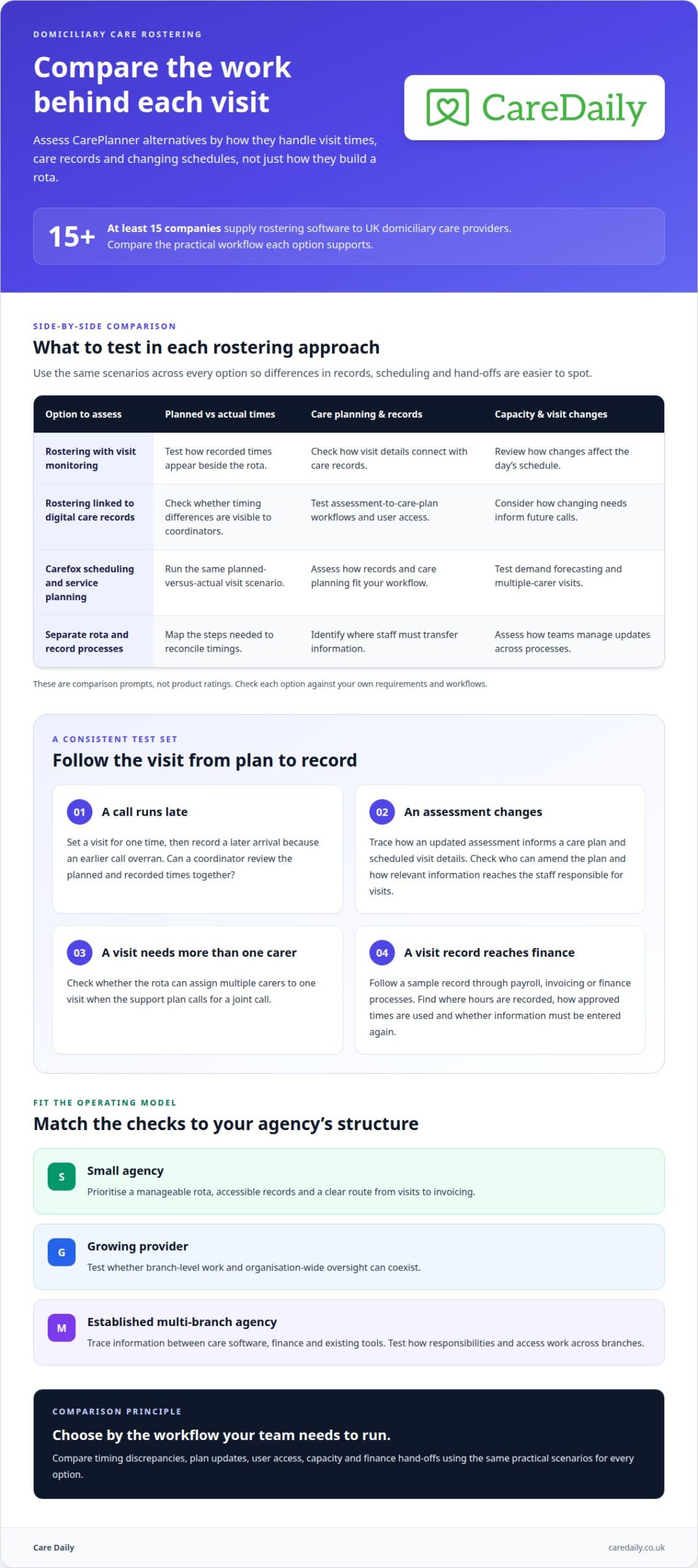
A rota shows what should happen; visit records help coordinators see what happened. When comparing CarePlanner alternatives for home care rostering, check how each system brings planned and actual visit times together. At least 15 companies supply home care rostering software to UK domiciliary care providers, so compare the working detail, not just the rota screen.
Test a realistic change: a morning call is scheduled for one time, but the carer arrives later because an earlier visit overran. Can the system show the planned and recorded times side by side, making the difference easy for a coordinator to review? Clear records help care agencies investigate patterns instead of relying on memory.
Then trace the information through scheduling, timesheets and compliance processes. Different visit types may attract different pay rates, so check whether the system supports those distinctions. Consider demand forecasting and capacity planning too: use upcoming care requirements, staff availability and travel between calls to spot pressure points before building the rota. For example, a new package with several closely timed calls could affect whether existing staff can cover the area.
Digital care records should inform care planning, not sit apart from it. Check whether assessment information can feed into care plans, whether teams can create and amend their own forms, and whether the software can adapt to their assessment process. Ask how access is managed for coordinators, carers, clients and family members. Configurable records can help providers respond to changes in their processes or external requirements while maintaining a consistent approach.
Carefox scheduling and service planning can be part of your comparison, but assess its fit using the same practical tests rather than assuming what it does from its name. Consider a scenario where an assessment changes a client’s needs: can you review the relevant care plan alongside scheduled visit details? Also check whether the system allows more than one carer to be assigned to a visit when the support plan calls for a joint call.
| Option to assess | Planned versus actual times | Care planning and records | Capacity and visit changes |
|---|---|---|---|
| Rostering with visit monitoring | Test how recorded times appear beside the rota. | Check how visit details connect with care records. | Review how changes affect the day’s schedule. |
| Rostering linked to digital care records | Check whether timing differences are visible to coordinators. | Test assessment-to-care-plan workflows and user access. | Consider how changing needs inform future calls. |
| Carefox scheduling and service planning | Run the same planned-versus-actual visit scenario. | Assess how records and care planning fit your workflow. | Test demand forecasting and multiple-carer visits. |
| Separate rota and record processes | Map the steps needed to reconcile timings. | Identify where staff must transfer information. | Assess how teams manage updates across processes. |
Compare the steps needed to review a timing discrepancy, update a plan and share relevant information with authorised users. Assess pricing against the functions your agency needs, rather than treating a low headline cost as the whole story. Clear records and joined-up care planning can make the review process easier to follow.
Choose an option that lets your team reconcile visits, respond to changing needs and manage access without unnecessary hand-offs.
Software for small and multi-branch agencies
A small domiciliary care agency may prioritise a clear rota and straightforward invoicing. A multi-branch provider also needs to understand how local teams share care records, assessments and finance processes. Compare software against your current workload and the practical steps involved in opening or managing another branch.
Jobber service business management software and OnePlan Care Software for domiciliary care are names to include in a market comparison, alongside Carefox. Product labels alone don’t show how well a system fits a care agency’s daily work. Map a real client journey: record an assessment, plan visits, update care records and pass relevant information to finance. Then assess how each option supports those steps.
Branch structure matters. A coordinator covering one local patch, for example, may need a different view from a senior manager overseeing several teams. Test how each system separates responsibilities, gives staff appropriate access and presents information across branches. Consider how a new care package affects staffing capacity, travel planning and the local team’s existing commitments too.
Test integrations in practice, rather than just ticking a box beside a product name. List the systems your agency already uses for payroll, invoicing or finance. Follow a sample visit record through the process: find where hours are recorded, how approved times are used and whether staff have to enter information again. Repeated manual entry can add reconciliation work; clear hand-offs make responsibilities easier to track.
Care software should keep assessments and care records useful as services change. Take a client whose support needs have changed after a review. Trace how the updated assessment is recorded, who can amend the care plan and how the change reaches the staff responsible for visits. For a multi-branch provider, repeat the scenario with another team to see whether local workflows stay clear.
- For a small agency: prioritise a manageable rota, accessible records and a clear route from visits to invoicing.
- For a growing provider: test whether branch-level work and organisation-wide oversight can coexist.
- For an established multi-branch agency: trace information between care software, finance and existing tools.
Compare Jobber, OnePlan Care Software and Carefox against the same client journey, branch roles and finance hand-offs; the best fit is the one that supports your actual operating model. If you’re mapping those requirements, you can outline your operational needs as a practical next step.
Check whether rostering can assign multiple care workers to one visit and compare planned visit times with actual times. Review what clients, family members and other stakeholders can access, and whether access can be tailored by user and role. Confirm that the software can be configured for your assessments and care plans, including changes prompted by external requirements such as regulations.
Home care rota and visit scheduling
A UK domiciliary care provider can plan a move from CarePlanner by mapping current workflows, transferring agreed data, then testing records and rotas before staff switch. Compare how each system handles visits, care-plan changes and information shared with other care management tools.
Rostering and scheduling features
Rostering and scheduling determine how coordinators turn planned care into workable daily visits. Compare systems on recurring calls, travel between clients, staff availability and changes after the rota is published. Test a double-up visit: can the rota assign multiple carers to the same call, and can the coordinator see each person’s responsibilities?
Then follow a late change. If a client’s appointment moves, assess how easily a coordinator can adjust the visit, notify the relevant team and keep a clear record of the revised plan. Look for a practical link between the rota and the client’s care plan. The schedule should help staff deliver agreed support, not leave them relying on separate notes or a phone message.
For a migration, list each visit pattern, staff role and key scheduling rule in use today. Match those requirements to the replacement system before moving data. Review a sample week with coordinators and carers, including calls with narrow time windows and visits requiring two staff members. This can reveal gaps a simple client-list transfer would miss.
Real-time automated scheduling
Real-time automated scheduling applies system rules to help adjust schedules as availability or visit requirements change. Compare it with manual rostering by testing the same scenario: a carer becomes unavailable, and a client still needs a planned visit. Assess which options the system presents, what the coordinator must decide, and how the final change appears to the team.
Judge automation by the decisions it supports, not its label. Check whether the system accounts for staff availability, visit timing, travel and required skills. A suggested rota still needs human review, particularly when a change could disrupt continuity or conflict with a client’s preferences. Providers need to understand why a proposed reassignment fits the care plan.
Integration matters too. Trace how a rota change reaches relevant care records and any connected tools your service uses. During migration, agree which system holds the working schedule and how updates move between systems. Test a changed call, an updated staff assignment and a client record, then resolve any discrepancies before relying on the new process.
For a fair comparison, have coordinators complete the same scheduling task in each system, then assess the steps, information and review points.
Matching carers by skills, language and cultural compatibility
Providers can compare available rostering systems against their agency’s workflows and requirements. Compare them with your agency’s rota, records, reporting and payroll workflows, rather than relying on product names alone.
Rostering features and ease of use affect how quickly coordinators can assign carers, arrange cover and find relevant staff information. Test the same client visit in each system, including a staff absence and replacement assignment.
Before choosing, check how the software records skills, language abilities, availability and client preferences. Also assess staff access, reporting, payroll hand-offs and how easily coordinators can amend a rota.
Software pricing varies, so request a quote and compare the cost against your agency’s needs, including users, branches, functions, onboarding, data migration and integrations.
Matching means more than filling an open visit. A client may prefer a carer who speaks their first language, while a particular support task may require relevant experience. The rota should help coordinators apply recorded preferences and skills consistently, without treating cultural compatibility as a substitute for the client’s own choices.
Start with the information your agency already uses. Identify where staff skills are recorded, how language preferences appear in client records and who can update those details. Then test a specific rota decision: a regular carer is unavailable, and the client has asked for a familiar communication style. Can the coordinator identify suitable cover and record the choice?
For a care management platform comparison, use the same scenario across every option. Check whether a coordinator can:
- Find carers with the skills recorded for a visit.
- See language preferences alongside availability.
- Arrange suitable covers without losing the client’s stated preferences.
- Review reports showing assignment changes and staffing patterns.
- Pass approved hours into payroll processes clearly.
Carefox is one option to include in the comparison. Separate company background from operational fit: test the software with the same rota scenario, then compare its staffing information, reporting and payroll workflow with your agency’s needs. A company profile alone doesn’t show how well its system supports person-centred matching.
For example, a client who prefers a Welsh-speaking carer needs that preference to be visible during rota planning, not buried in a note. Providers should also distinguish a stated preference from a required skill, so coordinators can make informed decisions and explain changes clearly.
Use your assessment findings to define the matching information your team needs at scheduling time. You can map your care management requirements as a practical next step.
Care Daily: Care Management Software
Care Daily provides care management software for providers who want to bring staff rostering and wider care processes together. Its staff rostering, digital care planning and policy and procedure library help teams review how schedules relate to care plans and organisational procedures.
Care Daily connects practical care workflows with the records and guidance teams use every day. It may suit agencies looking beyond scheduling alone, including organisations managing more than one type of care setting.
If you’d like to explore how Care Daily could fit your organisation, you’re welcome to get in touch or visit caredaily.co.uk.
Make the next move with a clear implementation plan
Choosing a rota system also means deciding how your team will manage change. Before committing, agree who will lead the transition, how coordinators and carers will learn the new process, and how you’ll gather feedback once the system is in use. This gives your decision a practical next step beyond comparing features.
Your review of CarePlanner alternatives for home care rostering can now lead to a focused discussion about the workflows your organisation needs to support. Care Daily brings together care management software, digital care planning and a policy and procedure library, making it an option to consider when you want to look beyond scheduling alone.
If you’re ready to explore how it could fit your organisation, contact Care Daily to discuss your needs. A clear plan can help your team approach the decision with confidence and keep the focus on consistent, person-centred support.
Frequently Asked Questions
Which UK home care rostering software offers staff scheduling, visit management and care planning?
Care Daily, Carefox, OnePlan Care Software and Jobber are options to compare for UK domiciliary care. Care Daily combines staff rostering with digital care planning; assess the other products against your required workflows. For a practical comparison, trace a client’s journey from a care-plan update to a scheduled visit, then consider what coordinators need to review if the client’s needs change before the call.
Which alternatives integrate with UK payroll, accounting and electronic call monitoring systems?
Integration varies between platforms, so compare the data flows your agency relies on rather than assuming compatibility from a product name. Check how approved visit times reach payroll, whether invoicing information can be transferred and how electronic visit monitoring records reach coordinators. Care Daily offers invoicing and payroll integration and electronic visit monitoring; assess how these fit your agency’s existing systems and processes.
Which home care rostering platforms support UK social care compliance and CQC requirements?
Look for a platform that helps your organisation manage care records, staff schedules and evidence for compliance processes. Care Daily offers CQC-aligned policies and care quality compliance tools. Software can help organise information, but your agency remains responsible for its own practice and records. Consider how a manager can retrieve relevant visit information when reviewing a concern or preparing inspection documents.