A complete rota is not necessarily a reliable one. UK home care scheduling software should bring visit planning, staff rostering and relevant care information together, helping coordinators arrange cover while supporting continuity between clients and carers.
A change to one visit can affect travel, the rest of a carer’s day and the consistency a client experiences. The right system makes these moving parts easier to manage, but the most useful features depend on how your service operates.
This guide explains what domiciliary care management software does and how scheduling, care records and payroll workflows can work together. It also compares features to consider when choosing a platform for a UK care service, helping you focus on what will make day-to-day coordination clearer and more dependable.
Key Takeaways
- Assess whether scheduling tools support continuity between clients and carers, as well as practical cover for changes to visits.
- Look for a joined-up view of rotas, care plans and records to help coordinators make informed decisions.
- Compare platforms by how they handle rostering, billing and payroll workflows, not just by their scheduling screens.
- Consider how mobile access and clear visit information could support carers during a working day.
- Choose features that fit your service’s day-to-day needs, including the way your team manages compliance and care quality.
What is home care management software?
Management software brings client records, care plans and staff schedules into a shared system. For a domiciliary care team, it can help coordinators match carers to client needs, manage workloads and keep visit information accessible.
Employee and workload management
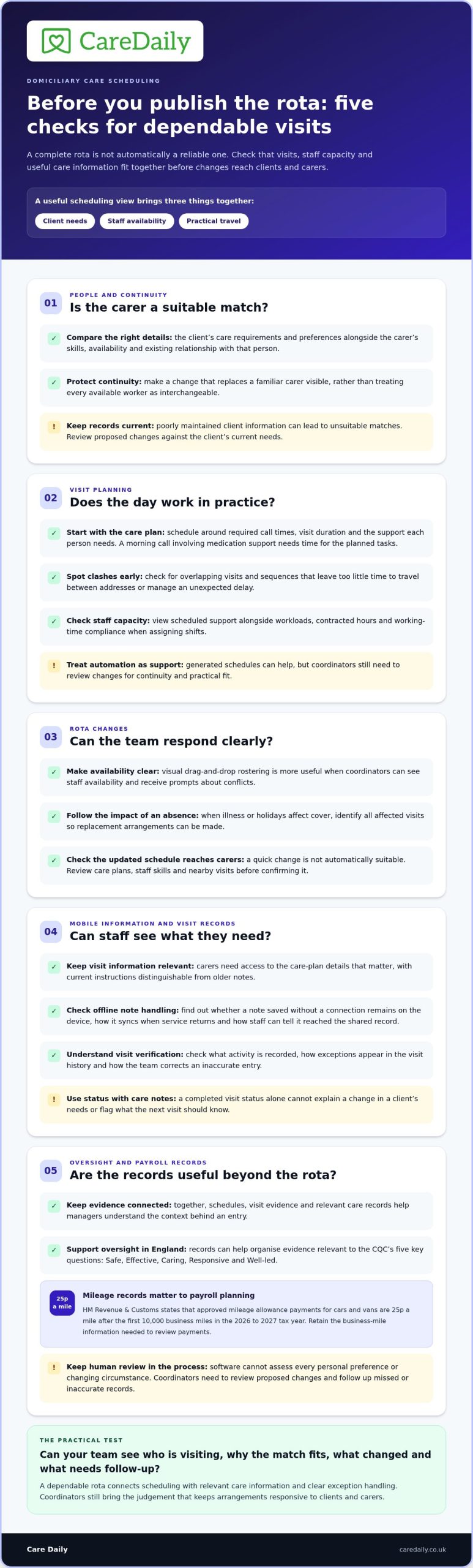
Start with how the system supports matching. Coordinators should be able to compare a client’s care requirements and preferences with each carer’s skills, availability and existing relationship with that person. Prioritising continuity can mean flagging a rota change that would replace a familiar carer, rather than treating every available worker as interchangeable.
Workload views should help managers spot rota clashes, such as overlapping visits or a carer assigned to locations that are difficult to reach in sequence. Consider how the system displays scheduled support alongside staff capacity. These records help coordinators make informed adjustments, but they do not replace the judgement needed when a client’s needs or a carer’s circumstances change.
Payroll planning also involves travel. HM Revenue & Customs states that approved mileage allowance payments for cars and vans are 25p a mile after the first 10,000 business miles in the 2026 to 2027 tax year. A mileage record can help managers review travel alongside visits and payroll information.
Mobile apps and offline notes
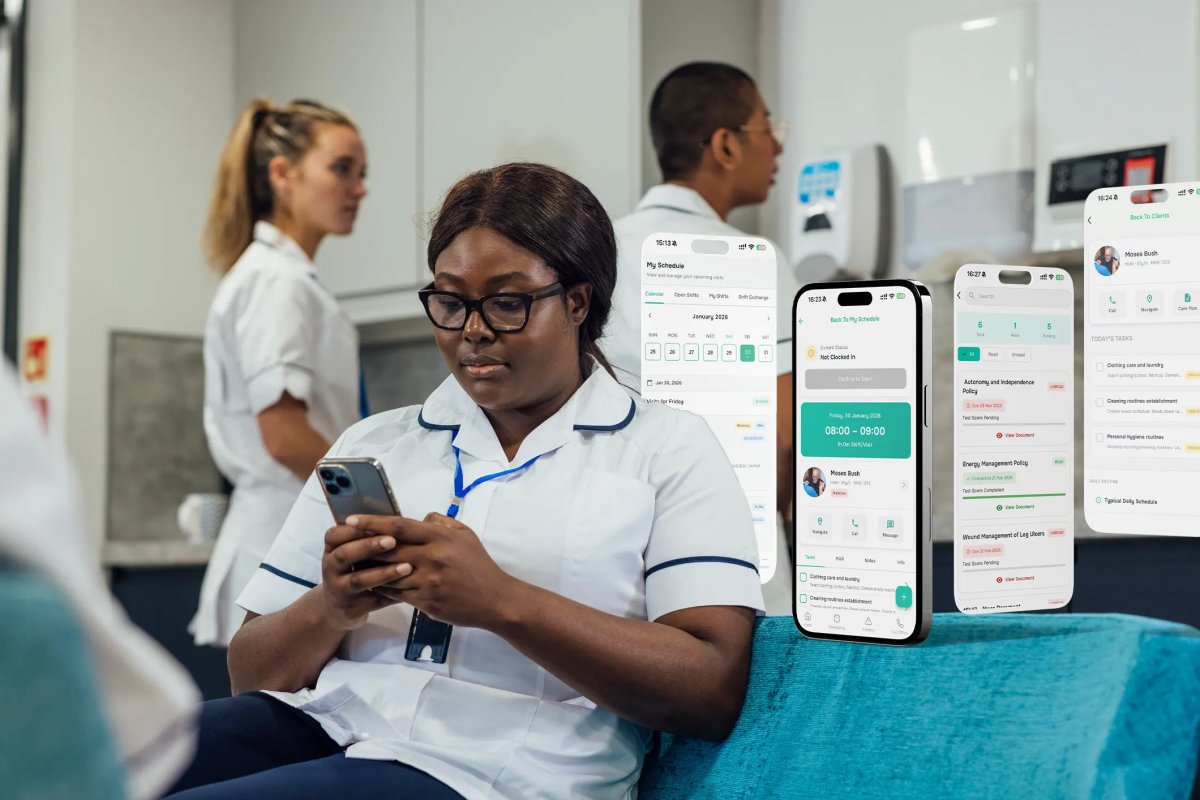
A carer’s mobile app can display their schedule and relevant client details, then support updates to records and notes during visits. This can reduce reliance on handwritten notes that must be transferred later. For example, after a client declines a planned activity, the carer can record what happened so the team can follow up.
Offline note-taking matters when a signal drops inside a client’s home. Check how the app handles a note saved without a connection: whether it remains on the device, how it syncs when service returns and how the carer can tell if the update has reached the shared record. These details affect how confidently teams can rely on mobile records.
Access should also suit the visit. Carers need relevant care-plan information without having to scroll through unrelated records. Managers should consider how the app displays updates and whether staff can distinguish current instructions from older notes.
Visit verification
Mobile visit verification gives coordinators a record of visit activity, helping them identify a missed or delayed call and follow up. Find out what the system records and how that information appears in the visit history. Clear records are more useful than a status that leaves managers unsure what happened.
If a visit is marked incomplete, for instance, the coordinator needs enough context to distinguish a late update from a visit that needs immediate follow-up. Consider how carers record changes, how managers see exceptions and how the team corrects an inaccurate entry. Verification supports oversight, but staff still need a clear process for responding to exceptions.
Use visit records alongside care notes, not instead of them. A completed status alone cannot explain that a client’s needs changed during the call or that the next visit requires attention.
Regulatory support and software limitations
For adult social care in England, CQC’s five key questions are Safe, Effective, Caring, Responsive and Well-led. Software can organise visit records, care notes and other evidence to support oversight against these questions. UK scheduling should also help managers review working-time compliance and contracted hours when assigning shifts.
For mileage records, retain the business-mile information needed to review approved allowance payments. Where possible, keep the schedule, visit evidence and relevant care records together so managers can understand the context behind an entry.
Software has limits. Poorly maintained client information can lead to unsuitable matches, and a mobile app may be less useful without connectivity. Automated schedules cannot assess every personal preference or changing circumstance, so coordinators must review proposed changes and correct missed or inaccurate records.
Home care scheduling and rostering
A domiciliary care rota must coordinate client visits, staff availability and practical travel between addresses. Scheduling and rostering tools can bring these decisions into one working view, making it easier to manage changes as the day develops.
Client visit scheduling
Start with how the system places visits across a client’s care plan. Coordinators should be able to work from required call times, visit duration and the support each person needs, then assign a suitable carer. For example, a morning call involving medication support needs enough time in the rota for the planned tasks.
Automation can help generate schedules and update them when illness or holidays affect cover. Coordinators still need to review proposed changes for continuity and practicality. If a familiar carer becomes unavailable, the system should make affected visits visible so the team can arrange replacement cover rather than discover gaps during the shift.
Consider how coordinators can spot conflicts before publishing a rota. A visit placed too close to another appointment may leave little time for travel or an unexpected delay. Useful scheduling views make these clashes easier to see and help the care business adjust the sequence before clients are affected.
Drag-and-drop rostering
Drag-and-drop tools let coordinators move visits or shifts between staff in a visual rota. This can simplify a common task: replacing a carer who has reported sick and checking which other visits are affected. Look for clear availability information and prompts that reveal conflicts before the edited schedule is shared.
A quick change is not automatically a suitable one. Assigning a carer to a client they do not know, for example, may disrupt continuity even if the slot appears free. Review care plans, staff skills and the order of nearby visits before confirming the change. The software should make relevant details easy to see, not hide them behind a simplified calendar.
Staff scheduling works best when rota changes reach the people who need them. Check how a revised visit appears in the carer’s schedule and whether coordinators can identify changes that still need action. Alerts can draw attention to a rota issue, but staff need clear information about the affected client, visit and revised timing.
Integration matters beyond the rota. Connecting scheduling with care management and finance can reduce manual reconciliation between visits delivered, hours worked and invoices prepared. A changed call, for instance, may affect both a carer’s recorded hours and the service provided to a client. Consider whether information flows between these workflows or staff must enter the same change again.
When reviewing a platform, map one real shift change from the first report through to updated visits, staff records and finance. That practical walkthrough shows where manual steps remain. If you’re considering a more connected workflow, explore the next steps for your care service.
UK home care and domiciliary care software comparison
A useful comparison looks beyond the rota screen. Assess how each system connects scheduling with care records, medication workflows, compliance and finance.
Options for smaller care agencies
Which home care scheduling software is best for small UK care agencies? The best fit covers essential operations without adding workflows your team will not use. Compare how a system handles visits, staff availability, client records and compliance during a typical working day.
Map a late-running morning call through the rota, for example. Can the coordinator see which later visits are affected, update the schedule and preserve a clear record? A smaller team may have one coordinator managing these changes alongside other duties, so it matters how easily they can find the information they need.
Compare systems using the same scenario rather than relying on feature lists. Include a new client, a carer absence and a medication-record update. Note how many steps each scenario requires and whether information must also be entered into another document or system.
Software cost considerations
How much does home care scheduling software cost in the UK? Suppliers commonly price per carer or client, monthly or annually, and may charge separately for onboarding, training or premium modules. For a specific system, the price depends on your requirements and is provided after a quote request. Cost factors include user numbers, onboarding, training and selected modules.
Compare the pricing basis with your care business’s likely needs. A per-carer model and a per-client model may work differently as staffing or caseload changes. Include rostering, medication management and compliance functions in the comparison rather than judging the headline licence fee alone.
Platforms vary in scope. One may focus on scheduling, while another connects visits with care management, client records and invoicing. Identify which operations your team currently handles across separate tools, then assess whether a joined-up system would reduce duplicate entry. For example, compare how a delivered visit is recorded as a service and then informs invoicing.
Compare medication and compliance workflows separately, too. Check how staff access a medication record alongside relevant client information and how managers retrieve records for oversight. If a system stores a document separately from the visit history, staff may need to switch screens or repeat information during routine work.
Also assess implementation and ongoing use. Consider the training coordinators and carers need, how software updates are managed and how the supplier supports the care business as it adopts the system. Features only help operations when staff can use them consistently during real shifts.
Use a short, shared evaluation: choose representative workflows, record each system’s steps, and compare the gaps that remain. This gives managers a practical basis for weighing fit against cost. To map your requirements into a next step, outline your care service’s operational needs.
What features should UK home care scheduling software include?
Assess whether a platform supports the work around each visit, not just the rota. For a domiciliary service, useful features connect scheduling decisions with travel, records, workforce oversight and governance. Comparing home care scheduling software in the UK against real workflows shows where information stays connected and where staff still need separate processes.
Travel, continuity and schedule changes
Look for geographic route planning and travel-time calculations alongside visit scheduling. A rota that places distant calls close together may look complete but prove impractical on the road. Coordinators need to assess journey implications before publishing changes, particularly when illness or holidays require cover.
Continuity should inform proposed assignments. A system can prioritise familiar carer-client relationships and flag changes that may disrupt them. Mobile updates help carers receive revised visit details, while coordinators can see which schedule changes need attention. When reviewing home care scheduling software, test whether the system makes these effects clear before a revised rota is issued.
Visit records, medication and governance
Consider how a scheduled visit connects to evidence, including timestamped visit records, electronic care notes and eMAR logs. Each provides different context. A completed call records visit activity, for example, while a medication entry documents a separate part of care delivery.
Auditing tools, incident reporting and compliance management can support follow-up. Test a realistic scenario: a manager needs to review an incident alongside the relevant visit history. Can they find both records and understand what happened without searching unrelated documents? Clear connections make it easier to identify outstanding actions.
Workforce safeguards and confidentiality
Scheduling should help managers review planned hours before assigning shifts. The UK legislation register identifies Working Time Regulations compliance as a consideration when scheduling homecare workers. Check whether the system highlights a proposed shift that could push a worker over contracted hours.
Review access to confidential client and carer information, too. Carers need relevant details for their visits, while access should reflect each user’s role. A clear permissions structure helps managers control who can view or amend sensitive records.
Connected information and reporting
Integration can reduce duplicate entries across scheduling, care plans, staff records and governance workflows. Check how a change to a care-plan instruction becomes visible to the staff who need it. That practical process matters more than a long feature list.
Reporting should help managers investigate operational questions, such as recurring late visits or rota gaps. Test a report, then trace a result back to its underlying records. This shows whether the figures provide useful context or simply add another screen to review.
Use these criteria to assess your workflows and priorities. Explore a care management setup for your service.
Care Daily: Care Management Software
Care Daily brings care management together with digital care planning and staff rostering, helping providers coordinate operational work alongside individual support needs. Its Policy & Procedure Library gives teams access to policies and procedures relevant to their service.
Care Daily gives care teams practical tools to manage their work and support consistent practice. The platform can suit providers looking to bring care planning and rostering into a broader management system, rather than treating the rota as a standalone task.
Visit caredaily.co.uk to learn how Care Daily’s care management platform could support your service.
Make your next step practical
Choosing home care scheduling software in the UK is a chance to shape how your team works, not simply replace a calendar. First, identify the operational pressure you most want to address, such as coordinating rota changes, keeping records aligned or giving managers a clearer view of day-to-day work. Use that priority to guide your assessment of how a platform could fit your processes.
Care Daily supports care providers with connected tools for care management, policy compliance and digital care planning. If you’re considering how these could work within your service, share your requirements with Care Daily. A clear view of your team’s priorities is a useful starting point for choosing a system that supports consistent, person-centred care.
Frequently Asked Questions
What are the best home care scheduling software providers in the UK?
The right provider is one whose system fits your agency’s workflows, team capacity and care-record needs. When comparing UK home care scheduling software, assess how each option handles a representative task, such as arranging a new client’s visits and recording a change to their support. Compare the steps involved, the information staff can access and any work that remains outside the system. This gives your team a practical basis for judging fit.
How do UK care scheduling systems handle staff rotas, visits and shift changes?
These systems help coordinators organise visits and rotas, then adjust schedules when staffing or client circumstances change. If a carer calls in sick, for example, the coordinator can review affected calls, assign cover and communicate the revised plan. During a software comparison, follow the change through to its record and check that outstanding actions remain visible. This shows how the system supports coordination beyond the initial rota.
Which UK home care scheduling software supports mobile apps and electronic visit verification?
Mobile app and visit verification features vary between systems, so assess the carer’s full workflow. Check how staff view calls, record visit activity and explain an exception, such as a client not answering. For UK home care scheduling software, also examine how coordinators see missed updates and how notes saved without a connection are handled later. These details help you judge whether records give managers useful context.
How does home care scheduling software integrate with UK payroll, invoicing and care planning systems?
Integration can connect visit information with payroll, invoicing and care plans, reducing repeated data entry. Trace a completed visit through each workflow: identify what information transfers, who reviews it and how a correction appears in related records. If a visit duration changes, for example, see how that amendment appears in the relevant administrative process. This practical test shows whether connected systems preserve accurate context.
How do home care agencies choose and implement scheduling software?
Start by documenting current workflows, then assess shortlisted systems against real examples from coordination, care delivery and administration. Ask for references from agencies of a similar size that have used the system for at least two years. Before implementation, assign responsibility for preparing data, training staff and managing existing records. A planned transition helps coordinators and carers understand how their daily routines will change.